How ElevenLabs Was Not Killed by Qwen3 TTS
TL;DR — Listen to this and keep reading:
That’s the April 6th episode of the The M.Akita Chronicles podcast, already generated with the new ElevenLabs v3 pipeline. Subscribe to the show on Spotify so you don’t miss new episodes like this one.
When Qwen3 TTS dropped, back around January this year, everyone on Twitter/X and on the AI newsletter circuit was shouting “ElevenLabs killer”. There’s a Medium piece claiming it’s the first real open source threat to ElevenLabs. There’s a post on byteiota saying 3-second voice cloning beats ElevenLabs. There’s an analysis on Analytics Vidhya calling it the most realistic open source TTS released so far. The enthusiast internet consensus was: we finally have open source that can go toe-to-toe with ElevenLabs, the tables have turned, it’s just a matter of time.
I decided to test it on my own production pipeline, as usual. I built out a whole pipeline on top of Qwen3 TTS 1.7B to generate the weekly podcast for The M.Akita Chronicles, and I documented the behind-the-scenes on the serving-AI-in-the-cloud post. Anyone who wants the detail on cold starts, voice cloning, and sampling parameters that change from one mode to another, that’s the place. I’m not repeating it all here.
This post asks a different question. After almost two months running that setup in production, shipping an episode every Monday, last night I finally pulled the plug on Qwen3 and switched the whole thing to ElevenLabs v3. Let me tell you why.
What didn’t work on Qwen3
Between February 15 and March 30, I made dozens of commits fine-tuning the podcast flow: prompts, sampling parameters, generation order, leading silence on the voice clone sample, volume normalization, pronunciation of tech acronyms. Fixing Marvin’s voice, which was clipping the first syllable because the reference audio started without any lead-in silence. Tuning Akita’s voice to sound more confident and assertive. Adding crossfades between section jingles. Sorting out the “podcast” pronunciation so it didn’t come out as “pódcast”. Making the script generator prefer Portuguese over gratuitous anglicisms so the TTS wouldn’t choke. Each of those fixes was a multi-hour session of listening to audio, regenerating, tweaking a parameter.
The result came out acceptable. “Acceptable” in the sense that I managed to ship every episode without re-recording anything by hand. But if you listen closely, the Qwen3 voice has that unmistakable AI-generating-audio quality. Flat intonation, uniform rhythm. Over long stretches you can feel it’s a machine talking. Good enough to ship, but miles away from what you’d hear on a professional podcast made by humans.
The worst problem was English pronunciation. My podcast covers tech news, so terms like “MCP”, “RAG”, “Claude Opus”, “GPT-5”, “open source” show up in every conversation. Qwen3 took those terms and pronounced them with a Brazilian accent, something like “oh-pen-ee-sohrss-eh”, that kind of thing. Unlistenable for the audience. The workaround I had to implement was manually mapping in the script-generation LLM prompt which English words to swap for Portuguese equivalents. The prompt today has a whole section split between “keep in English” (proper nouns, brands, terms already adopted into Brazilian tech lingo) and “translate to Portuguese” (gratuitous anglicisms), looking roughly like this:
**REPLACE with Portuguese** (common English words that have natural
Brazilian Portuguese equivalents):
- "update" → "atualização"
- "release" → "lançamento"
- "feature" → "recurso/funcionalidade"
- "deploy" → "implantação" or just "colocar em produção"
- "trade-off" → "dilema" or "escolha"
- "performance" → "desempenho"
- "default" → "padrão"
- "insight" → "percepção/sacada"
- "skills" → "habilidades"
- "approach" → "abordagem"
- "highlights" → "destaques"
I call this “scrubbing anglicisms so the TTS doesn’t choke”. The funny part is I didn’t want that level of restriction on my script. I wanted the voice to just pronounce “update” when “update” was the natural word. Since the model couldn’t, I had to mutilate the podcast’s vocabulary so the final result was actually listenable. It’s a band-aid, the kind you add hoping to rip it off later when the tech grows up.
The experience with ElevenLabs v3
Yesterday afternoon I opened an ElevenLabs account, bought the Pro plan ($99/month), and started experimenting with the eleven_v3 model, which shipped in February of this year. Thirty minutes later I had a proof of concept running, and about two hours later the whole podcast system was migrated. The effort gap is an abyss.
The technical details of the migration ended up in an internal project doc, so here’s the summary comparison table that actually matters:
| Dimension | Qwen3 TTS 1.7B (old) | ElevenLabs eleven_v3 (current) |
|---|---|---|
| Quality (Akita) | Good, cloned from real audio | Better, same clone but more natural prosody |
| Inline emotion in script | Not supported | [sighs], [sarcastically], [excited], [laughs], works in pt-BR |
| Cold start | 5 to 15 min spinning up a RunPod GPU before each run | Zero, HTTPS call with immediate response |
| Throughput | ~1× real time (serialized) | ~6× real time with concurrency 4 |
| Wall clock for a 28-min episode | ~25 to 30 min | ~4 min |
| Operational surface | RunPod, Docker, FastAPI, Qwen weights, GPU billing | One env var (ELEVENLABS_API_KEY) |
| Cost per episode | ~$0.08 of GPU | ~$2.70 in ElevenLabs credits |
Look at the last line. Qwen3 costs less than ten cents of a dollar per episode. ElevenLabs costs almost thirty times more. And it’s still worth it. The other lines on the table solve problems that were eating hours of my week. I no longer need to write code to scale GPUs in the cloud, I don’t need to wait for the machine to spin up every time, I don’t need to babysit a model or rebuild a Docker image when the weights change. The operation became a single line of configuration.
And here’s the interesting part: the inline emotion tags. The v3 model accepts markers like [sighs], [sarcastically], [dryly], [excited], and changes the delivery accordingly. This works in more than 70 languages, including Brazilian Portuguese. It transformed script generation, because now I can ask the LLM that writes the script to drop emotional tags at the right moments, which gives a liveliness Qwen3 couldn’t deliver in a million years. A concrete example of what comes out of the script later:
AKITA: Isso é simples. [dismissive] Quem ainda acredita que Bitcoin
vai morrer não tá prestando atenção.
MARVIN: [sighs] Mais uma semana, mais uma leva de devs confiando
cegamente em pacotes npm. Previsível.
I even have two separate tag palettes, one for Akita (expressive but controlled, uses [excited], [dismissive], [emphatic]) and another for Marvin (stoic, just [sighs], [sarcastically], [tired], [dryly]). That’s all encoded in the script generation prompts so the LLM knows which character is allowed to use what.
About Marvin’s voice
For listeners who are already used to Marvin’s voice, don’t worry: I cloned him on ElevenLabs using the same audio sample I had used to train on Qwen3. It’s the same voice. It just sounds even better now, because the ElevenLabs model captures nuance and prosody that Qwen3 couldn’t deliver.
Listen to it and tell me
To prove the talk is real, here’s Monday’s episode, April 6th, already generated with the new pipeline:
If you’re already a podcast listener on Spotify and you’ve heard previous episodes made with Qwen3, compare them and tell me in the comments whether you notice the difference or whether it’s the same to you. I’m genuinely curious how much of this is my trained ear after hours of listening to TTS audio and how much is an obvious difference for a casual listener.
Starting next week, every episode of the podcast will be generated by ElevenLabs v3. The newsletter is already plugged into the new pipeline, the scheduled jobs to pre-warm the RunPod GPU have been disabled, and the legacy Qwen3 code stays in the repo as plan B in case v3 starts acting up chronically. Two file edits and I can switch back. I probably never will.
The part about dubbing the YouTube videos
Now the hook for the second half of this post. On the anniversary piece I published earlier today, I told the story of how Claude Code translated nearly half my blog to English over a weekend. In the same spirit, I went after dubbing the videos on the Akitando channel.
The channel has 146 episodes, around 96 hours of technical content in Portuguese, and more than 500k subscribers. I already had the subtitles translated (one curated .srt per episode), and YouTube even offers automatic English dubbing. But the result is like Google Translate circa 2015: gets the idea across, nobody wants to listen for very long.
I tested ElevenLabs’ three voice approaches and only one worked. Speech-to-Speech converts a voice but doesn’t translate. The Dubbing API does translate but creates the voice on its own, with no way to force a specific clone. Only Text-to-Speech could solve this: take the English .srt I already had, send each block to the TTS endpoint with my cloned voice, and assemble the audio aligned to the original video.
But having a translated .srt is not enough. Raw subtitle translation doesn’t survive TTS. Passages with source code, URLs, hex hashes, lists of shell commands — the model switches to spelling mode and the audio comes out at twice the expected duration. Translations that run too long blow past the time window and need to be condensed so the voice doesn’t sound like an auctioneer. Truncated SRTs need to be completed. And after each fix, you re-run the pipeline, listen, find the next problem, fix it, re-run. The whole thing was a cycle of interruptions, manual corrections, and re-runs — a far cry from the “press a button and get a dub” fantasy.
The big challenge was the accent. My cloned voice was trained on Brazilian Portuguese audio, so when it tries to speak English, the thick accent comes through. ElevenLabs has an [American accent] tag that works on v3, but on top of a voice trained in another language it’s weak — the Brazilian accent still bleeds through. The fix was to train a second voice of mine, English only. I recorded a few minutes in my best American accent, uploaded it as a separate Instant Voice Clone in my account, named it “Akita English”, and set the pipeline to use that voice by default. The result comes out more natural, no tag needed, and the voice identity is still mine.
The honest ceiling on my English voice quality
Let’s be frank. I’m a Brazilian who speaks English, not a native speaker, and I don’t have the time or patience to drill pronunciation for hours. A clone can only ever be as good as the source sample — if the source is a non-native reading a script, the clone inherits every imperfection. No clone is going to make me sound like “Fabio speaking perfect English” because that sound doesn’t exist for the model to learn from.
To get to the version that’s running today, I recorded five different training samples throughout the day, each with a different rhythm and script, and ran an A/B battery against the original Portuguese. None sounded native, and that was never the goal. The realistic bar was more modest: sound recognizably like me, read technical content without stumbling, and carry a full one-hour episode without wearing the listener out. The winner ended up being the first iteration, the original “Akita English”. Far from perfect, but good enough to ship. Swapping it out later is literally one line in the config file.
What surprised me most along the way was realizing that the rhythm of the training sample matters more than the timbre. The clone learns the cadence of whoever recorded it: iteration 5 came out 25% slower than iteration 2 reading the exact same text, purely because I recorded that particular sample more slowly. For dubbing tech videos, the right target is the rhythm of a “YouTube tech explainer” — brisk, energetic, around 150 words per minute. No audiobook pacing.
How I align audio to the original video
A non-obvious point: spoken English tends to be longer than equivalent Portuguese. If you just generate the audio for each subtitle and paste it at the original timestamp, the dub drifts later and later. With 30 minutes of video you’re already several seconds out of sync.
My approach was to attack the problem in layers. The first version split the SRT into smaller blocks, called “chunks”. Each chunk maxed out at 700 characters (so v3 wouldn’t hallucinate) and could only cut at a sentence boundary, never mid-sentence. A simple algorithm accumulated subtitles into a buffer until it was about to overflow, then walked back looking for the last cue whose text ended with ., !, or ?, and flushed only up to there. The cues still in the buffer got rolled into the next chunk. Each chunk also stored the start and end timestamps of the subtitles it covered, so the assembly step knew exactly where to drop that piece of audio later.
# For every incoming cue, check whether adding it
# would push the buffer past the char cap.
for cue in cues:
    projected = buffer_char_len(buf) + len(cue.text)
    if projected > max_chars and buf:
        # Walk back for the last cue in the buffer that
        # ends in '.', '!', '?', or '…'.
        sentence_end = last_sentence_end_index(buf)
        if sentence_end is not None:
            buf = flush(buf, sentence_end, chunks)
        else:
            # Run-on sentence longer than max_chars with no
            # terminator. Rare, but happens. Warn and cut.
            log.warning("run-on sentence > %d chars — "
                        "splitting mid-sentence as a last resort",
                        max_chars)
            buf = flush(buf, len(buf), chunks)
    buf.append(cue)

    # Soft-break: if the buffer is already at least 60% full
    # AND the current cue ended a sentence, flush now. Keeps
    # chunks balanced around 60-100% of max.
    if cue.ends_sentence and buffer_char_len(buf) >= max_chars * 0.6:
        buf = flush(buf, len(buf), chunks)
Technically, this was the turning point: instead of letting the dub follow the visual structure of the subtitle file, the chunker started following the real paragraph structure of the script. I won’t retell the whole story of how I got there and why it eventually forced a mass rerender, because I come back to that later in the section about the problems that only showed up after the first upload. The technical point here is simple: once the window represented a real spoken paragraph, the audio started sounding natural, and the stretch target could move from 92% to 95%.
Once the chunking is done, there’s still the problem that English runs longer than the Portuguese equivalent when spoken. The trick here is predicting whether a chunk is going to blow past its target window before generating the audio. If the ratio characters / 16 chars-per-second already exceeds the target duration by a margin, the pipeline passes the speed parameter directly to the ElevenLabs API, asking the model to natively generate faster speech. This preserves prosody way better than compressing afterwards. The ceiling is 1.15× (beyond that the voice starts sounding rushed).
# before calling the API, predict if it will overrun
expected_sec = char_count / EXPECTED_CHARS_PER_SEC  # 16 chars/s
predicted_ratio = expected_sec / target_sec

voice_speed = 1.0
if predicted_ratio > PREEMPTIVE_SPEED_THRESHOLD:   # 1.05
    voice_speed = min(predicted_ratio * 0.98,
                      PREEMPTIVE_SPEED_MAX)         # cap at 1.15
    voice_settings["speed"] = voice_speed
Even with preemptive speed turned on, sometimes the generated audio still comes out a tiny bit longer than the target window. That’s what the second safety net is for: measure the actual audio with ffprobe after it’s generated, compare to the target window, and apply the ffmpeg atempo filter to compress in post if it exceeded the 2% tolerance, capped at 1.20×. Combining native speed (1.15×) with atempo (1.20×) gives an effective compression ceiling of 1.38×, enough to fit naturally even in the worst cases without breaking quality.
# after generating the chunk
actual = ffprobe_duration(chunk_path)
ratio = actual / target_sec

if ratio > FIT_TOLERANCE:       # 1.02
    # compress the audio without touching pitch
    ffmpeg_atempo = min(ratio, FIT_MAX_ATEMPO)   # 1.20
    apply_atempo(chunk_path, ffmpeg_atempo)
When a generated chunk comes out shorter than the target window, the pipeline slightly stretches the audio (without affecting pitch) to reduce the ugly silence after it ends. The goal isn’t to fill the whole window — a natural pause between sentences is fine — just to smooth over the worst offenders that would feel like “cut audio”.
On a big episode, 95 minutes, 194 chunks, the total cumulative drift came out to -0.7%. About 43 seconds of drift across the entire episode, imperceptible while you’re watching.
What saved the budget on this architecture is that each chunk lives on disk as its own .mp3. The pipeline keeps a manifest with the normalized text of every chunk, and before calling the ElevenLabs API, it compares the current text against the cache. If the text hasn’t changed, it reuses the existing audio without spending a single credit. If I rewrite a problematic cue, only the chunks affected by that cue get regenerated — the rest of the episode stays untouched.
This is what made the iterations viable. I’d run the batch, listen to sections, spot a problem (translation too long, a code snippet the TTS couldn’t pronounce, a chunk boundary that landed at a bad spot), fix the SRT or tweak the chunker parameters, and re-run. Each re-run consumed a fraction of the credits and time of the original run, because only the changed chunks were regenerated. Without this cache, every iteration would have cost nearly as much as the first pass, and the total batch cost would have been two or three times higher.
That chunking change also had a heavy cache and cost impact, but I’ll leave that part for the later section where I explain the actual retracing and rerender cycle. Here, the important point is just that it was the right technical move.
When atempo can’t save you: rewriting cues before TTS
Not everything is about window alignment. There’s a kind of cue that breaks the whole pipeline, where neither preemptive speed nor post-process atempo can save it, and I only ran into it once I started running the batch over the more technical episodes of the channel.
The problem is this. The v3 reads at about 16 characters per second when you hand it normal conversational text. But when you hand it a cue stuffed with a literal URL, a hex hash, a binary string, a long sorted number list, or a shell code block, the model shifts into “spelling it out letter by letter” mode and drops to about 9 characters per second. A 500-character cue that was supposed to turn into 30 seconds of audio comes out at 55. The sanity check rejects it (because it’s past 1.8×), the automatic retry tries the same 500 characters again, the five retries all fail in a row, and the chunk gets stuck.
And this did not happen by accident. I used to write those passages that way because I knew the same scripts would later become blog posts, so it made sense to leave the raw URL, the full command, the complete hash, the whole technical detail there for the reader. In Portuguese that worked fine because it matched my original workflow exactly: record the video, then publish the matching text on the blog. What I had never prepared for was the next step, turning that same material into automated English dubbing. I only realized that conflict when the pipeline started failing for real.
I hit this first on ep052, the Ubuntu beginner’s guide, where two cues carried github.com URLs, hkp://keyserver.ubuntu.com URLs, and a 40-character GPG hash. Trying to fix that in post-processing is a waste of time. The 1.20× atempo ceiling will never compress 55 seconds into 30, and even if it did, the result would be an unlistenable chipmunk. The fix has to land upstream, in the text itself.
The solution was to rewrite the cue so it describes what the command does instead of showing the literal command:
- Run: apt-key adv --keyserver hkp://keyserver.ubuntu.com:80 \
-   --recv-keys 0A6A3E7F79F93EF8AAB9E92BAEBB74C8B5A1E44D
+ Run the full command in the video description to import the
+ signing key from the Ubuntu keyserver.
The on-screen English caption still shows the full command, so anyone reading the caption sees exactly what they need to type. The dubbed audio describes the intent in spoken language, which is what the TTS can deliver without choking. The instruction to the viewer stays intact, the characters-per-second ratio goes back to the expected 16, and the generated audio fits the original window without needing any stretch or compression in post.
I went hunting for cues like this across the whole batch. I scanned from ep052 through ep146 looking for cues with a high density of “hard” characters (digits, brackets, operators, long URLs, binary, hex) and ended up rewriting around 30 cues across 13 episodes:
- ep052 Ubuntu for devs: GitHub URLs and a 40-character GPG hash
- ep091 Hello World in C: binary examples
- ep095 640kB memory: address wrap, segment-offset
- ep106 CodeMiner: spelled-out email address
- ep113 Compression: pure binary strings, 75% hard characters
- ep115 SQL Server: long sorted number list
- ep120 Internet: dotted IP addresses
- ep121 Sockets: two JavaScript code blocks
- ep122 Proxies: Chrome User-Agent headers
- ep123 Secure networking: shell one-liners, Docker flags
- ep126 Gentoo: C
chrootdemo - ep136 Containers: GitHub release URL
- ep144 Cryptography: signing key address
The pattern was always the same: keep the caption showing the code, URL, or hash verbatim, and rewrite the spoken text so the narrator describes what it does. I could have automated the rewrite by letting an LLM read each cue and propose a substitution on the fly, but it felt safer to review them all by hand. It’s exactly the kind of thing where the model decides to “improve” a command to make it cleaner and ships with broken shell. The manual sweep took about two hours. The automated version would have cost the same time in review, with the bonus anxiety of having shipped a mangled command by accident.
There was also one weird structural case on ep146, about Docker Compose. Two cues had glued themselves together because of a missing blank line in the SRT, and pysrt was treating them as one giant cue. The TTS never even got to process it — the chunker choked first. I fixed it by hand, adding the missing blank line. One-character fix, half an hour to track down.
Reconstructing truncated SRTs
Another trap showed up when I went to run the full batch: three episodes had English captions that were too short relative to the actual video length. Ep056, the Rails episode, was the most absurd case. Nineteen minutes of caption for an 80-minute video. Sixty-two minutes of content with no caption at all. Ep057 (WSL 2) was missing 14 minutes, and ep068 (Git Direito) was missing 2.
This is a leftover from my old translation workflow. At some point I started hand-revising the caption, stopped partway through, and the .en.srt file got saved truncated at the spot where I stopped. You can’t dub an 80-minute video with a 19-minute caption. The chunker produces audio up to where it can read and then simply has no idea what to do with the rest of the video.
The fix became a new script. It diffs the truncated .en.srt against the .pt-orig.srt (the raw YouTube auto-caption, which always covers the whole video), picks up the cues that only exist in Portuguese, sends them to Claude Sonnet 4.6 with a strict JSON schema asking for cue-by-cue translation, and pastes the result back at the tail of the English file. The schema is the detail that matters. When I tried asking for the response as plain text in N|text format, Claude was dropping about 20% of the cues along the way. With a strict JSON schema, the drop rate fell to zero across the three repairs.
The numbers:
- ep068 Git Direito: +50 cues / 2 minutes reconstructed
- ep057 WSL 2: +368 cues / 14 minutes
- ep056 Rails: +1445 cues / 62 minutes (plus dropping 5 fake cues the old translator had invented at the tail to plug the gap)
After the repairs, the three episodes joined the batch normally and got dubbed like any other. The kind of tool you hope you never need, but when you need it, it’s worth writing once and closing the problem for good.
Automatic emotion tags
While I was testing, I decided to add one more step to the pipeline: an “emotion tagger” that reads the English SRT before it goes to TTS and inserts tags like [sarcastic], [thoughtful], [emphatic], [deadpan] at spots where a human narrator would naturally shift tone. The idea is to mimic what a professional voice actor would do — hit the emphasis at the right moments — without turning the video into a theater of overblown emotions.
This part is tricky for two reasons. First: letting an LLM loose on your SRT runs a real risk of it “improving” the text (swapping a word here, rewriting a sentence there) and you ending up with a dub that doesn’t match the caption. Second: LLMs love to overdo it. Ask them to tag emotion and they’ll put a tag on every other line. To guard against both, I pinned a small allow-list of tags and run a round-trip validation after Claude’s response comes back:
ALLOWED_TAGS: frozenset[str] = frozenset({
    "[sarcastic]", "[thoughtful]", "[emphatic]",
    "[deadpan]", "[serious]", "[amused]",
    "[sighs]", "[exasperated]", "[confident]",
    "[matter-of-fact]",
})

def validate_tagged(original, tagged):
    """Ensure the tagged SRT preserves the original with no drift."""
    if len(original) != len(tagged):
        raise TagValidationError("cue count mismatch")

    for o, t in zip(original, tagged):
        # Index and timestamp must match byte for byte.
        if o.index != t.index or o.timestamp != t.timestamp:
            raise TagValidationError(f"cue {o.index}: header drift")

        # Any tag outside the allow-list invalidates the whole response.
        bad = find_disallowed_tags(t.text)
        if bad:
            raise TagValidationError(f"cue {o.index}: {bad}")

        # The text with the tags stripped must be byte-identical to
        # the original. If the LLM swapped a word, rewrote anything,
        # validation fails and the response is rejected.
        if strip_tags(o.text) != strip_tags(t.text):
            raise TagValidationError(f"cue {o.index}: text drift")
When validation fails, the pipeline throws the response away and re-requests (or, if it keeps failing, ships the SRT untagged). On tag density, the prompt sent to Claude explicitly says: aim for N/10 tags in a SRT with N cues, hard floor of 1 tag per 12 cues, hard ceiling of 1 tag per 7 cues, distribution balanced across the four quarters of the episode, and no two tagged cues within 4 cues of each other. That rule set was the sixth iteration — the five before it either blanketed everything in tags or loaded them all into the first quarter.
Don’t let v3 hallucinate
A critical detail that only shows up in production: ElevenLabs v3 tends to hallucinate when you send very long blocks of text. I’ve seen blocks where the input text was around 1,500 characters and the model generated nine minutes of audio when the expected duration was a minute and a half. The model just decides to keep talking on its own, inventing content.
The official ElevenLabs docs recommend keeping each call under 800 characters to avoid this. I went more conservative and cut at 700, always at sentence end (never mid-sentence, because a mid-sentence split sounds horrible when concatenated). On top of that, I bumped stability to 0.9 (Robust mode, more stable but less responsive to emotion tags), turned on apply_text_normalization so the model pronounces numbers and acronyms correctly, and added a sanity check that rejects any generated audio longer than 1.8× the expected duration.
DEFAULT_VOICE_SETTINGS = {
    "stability": 0.9,          # Robust mode
    "similarity_boost": 0.95,
    "style": 0.0,
    "use_speaker_boost": True,
}

EXPECTED_CHARS_PER_SEC = 16.0
CHUNK_SANITY_MAX_FACTOR = 1.8   # reject if actual > 1.8× expected
With those mitigations in place, a 95-minute episode (194 blocks) ran start to finish with zero hallucinations. Exactly one block failed mid-run on a transient 502 error from the API, which the automatic retry caught on the next attempt.
Mastering for YouTube
YouTube doesn’t publish an official number, but industry consensus is that its playback loudness normalization targets -14 LUFS. Deliver audio louder than that and YouTube turns it down; deliver it quieter and it leaves it alone. To land on the target exactly, the pipeline runs ffmpeg’s loudnorm filter in two passes. The first pass measures the entire audio and prints the stats (input_i, input_tp, input_lra, input_thresh) as a JSON blob on stderr. The second pass reads those stats back in and applies a linear static gain to land precisely at -14 LUFS, -1.5 dBTP:
# Pass 1: measure
ffmpeg -i final_en.mp3 \
  -af "highpass=f=80,loudnorm=I=-14:TP=-1.5:LRA=9:print_format=json" \
  -f null -

# Pass 2: apply linear gain with the measured values
ffmpeg -i final_en.mp3 \
  -af "highpass=f=80,loudnorm=I=-14:TP=-1.5:LRA=9\
:measured_I=-18.3:measured_TP=-3.1:measured_LRA=5.4\
:measured_thresh=-28.7:offset=1.2:linear=true" \
  -ar 48000 -ac 2 -c:a pcm_s16le final_en_mastered.wav
Two passes instead of one because single-pass mode runs in dynamic compression and ends up “pumping” the gain during silent stretches. With linear=true on pass 2, the gain stays static on top of the pass-1 measurements, so no pumping. The result lands within ±0.1 LU of the target, which is effectively inaudible. The highpass=f=80 filter in front kills HVAC rumble and mains hum below 80 Hz, which the human ear doesn’t catch but will move peak measurements around.
The point where I thought it was done. And it wasn’t.
This is where the most annoying, and most educational, part of the project starts.
I really thought I had nailed it on the first big pass. The pipeline closed all 146 episodes, I uploaded everything, and it looked done. The durations matched, the files were all there, and the whole process had finally crossed the complete batch of nearly 96 hours of video. But it was exactly after that upload that I started noticing problems I simply had not anticipated.
The first scare was the jingle situation. I already knew many Akitando episodes begin with that short instrumental intro before I start talking, but I underestimated how much trouble it would cause. YouTube’s .srt is almost useless here, because a jingle is not speech. Sometimes it marks [Music], sometimes it gives you nothing useful, sometimes the window is just wrong. In the first assembly pass, some episodes lost the jingle entirely, some got it doubled, and in others the source-fill from the original audio already contained the right jingle and my splice came in on top of it, pushing everything else forward. This was the kind of bug you only catch when you sit down and actually listen to the final mastered file, not when you just look at total duration.
The fix was to stop hoping the subtitle would tell me where the jingle was and go straight to the source. I built a detector using the original video audio itself plus reference jingles, with an audit and repair pass on top of the mastered outputs already generated. That eventually became a small subsystem of its own: detector, audit, cached reassembly, exact-window repair. At the end of that detour, the set of changed episodes collapsed into a well-defined reupload bucket and the jingle problem finally came under control. It was one of those classic production moments: the first solution looked good enough until it hit the whole archive.
Then came the second punch, and this one was more expensive: I had forgotten a basic fact about YouTube subtitles. SRT is built to be read on screen, not to become spoken script. So an idea that was a full paragraph in my original text showed up split into several small cues, each with its own micro time window. In the first version of the pipeline I was using those cues as the generation unit for ElevenLabs. The result was TTS audio that was coherent locally, but the final assembly inserted artificial silences in the middle of sentences. Technically aligned, humanly weird.
Fixing that hurt because it meant walking several steps back. Instead of respecting the cue structure of the SRT, I had to go back to my original scripts and rebuild chunking around the paragraphs I had actually read when recording the videos. Almost every Akitando episode has a matching blog post with a ## Script section, and that is what saved the project. Because I had been meticulous back when I made those videos — writing the scripts first, reading exactly that on camera, and archiving both the videos and the scripts — I had a source of truth. That made it possible to map the script paragraphs onto the timings in the .pt-BR.srt, regroup the .en.srt on top of that, and regenerate the chunks in the right structure.
The problem is that this destroys the previous cache. Even when the text barely changes, if the chunk boundary changes then the TTS call changes too: different context, different prosody, different beginning, different ending. So this was not a touch-up. It was a full regeneration of everything again. That was the point where the cost started escaping my original estimate.
And just when I thought now it really was over, the third hit landed: external clips. Many videos on the channel include inserted footage from other sources. The Ruby on Rails episode, for example, has 37signals clips, Apple material, commercials, external inserts in the middle of the narrative. YouTube’s .srt did not know what to do with that. In some places it simply hallucinated text, in others the timings were completely wrong, and in others the original speech had nothing to do with the subtitle I was using as ground truth. Again: if you only look at the automation, it looks fine; if you actually listen to the final master, it isn’t.
The fix, again, was to leave the subtitle behind and go back to the original material. I built an external-clip window detector based on alignment gaps between transcript, .pt-BR.srt, speechless cues and chunks that crossed those windows. Then, instead of trying to dub what made no sense to dub, the process started recovering the original audio from the source video exactly in those stretches and filling the master with the correct source audio there. That’s what fixed the 37signals, Apple Education, Mac vs PC commercial and other inserted segments I had forgotten were even there.
That was the biggest lesson from the second half of this project: automation takes you very far, but the full archive always has more dark corners than you imagine on the first pass.
The dubbing batch numbers (and why it hurt more than I expected)
I need to correct myself again. I didn’t just miscalculate the first bill. I also overestimated how confident I should have been after the first full run.
When I upgraded to ElevenLabs Business, I thought I would finally have plenty of headroom. In practice, I didn’t. The latest dashboard screenshot shows 10,046,279 credits consumed out of a limit of 11,000,000, leaving 953,721:
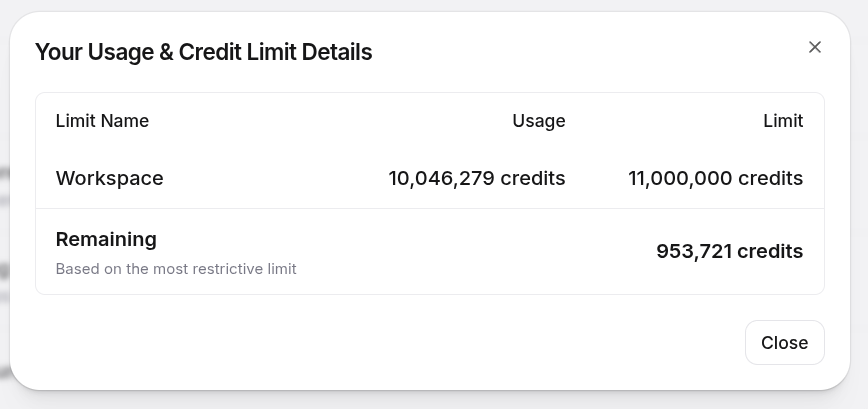
In plain English: I burned through more than 91% of the Business workspace limit. And that helps explain what “10 million credits” really means in this context. It does not mean “I rendered 146 episodes once”. It means rendering 146 episodes, discovering a structural problem, going back, fixing it, regenerating chunks, discovering another structural problem, going back again, rebuilding masters, auditing jingles, repairing external clip windows, uploading again. Every extra round costs money. And when the change invalidates the cache, it costs a lot.
The cost also doesn’t stop at ElevenLabs. All the subtitle curation, problematic cue rewrites, truncated SRT reconstruction, jingle audits, external clip detector work and the rest ran through Claude Code on the Claude Max 20× plan. Combined with the mass blog translation to English that I described in the anniversary post, the Claude Max 20× weekly limit hit 100%, with more than BRL 300 in extra usage on top. If you think generative AI becomes free once you’ve signed up for the plan, the invoices disagree.
Even so, I still think it’s worth it. We’re talking about 146 episodes, almost 96 hours of technical content, more than 5 years of channel archive. Doing that manually in a studio, with an actor, direction, pickups and human review on everything, would cost a completely different order of magnitude.
What changed was how I think about the project. At the start I was looking at this as “one very large batch”. In the end it was something else. It was digging through a whole archive, finding hidden exceptions, fixing old rot, rebuilding masters, rerendering, relistening.
The first full batch took a little under two days and made me think I had solved everything. I hadn’t. The second pass, with paragraph-aware chunking, was already expensive. The third, with jingle repairs and mastered-output fixes, cost more again. And the fourth hit came from the external clips I had not modeled correctly in the first automation pass.
But now, finally, I think it’s done. Or rather: I hope it’s done. Everything has been uploaded again, for the last time. It isn’t perfect in the absolute sense of the word. It’s as good as I can get it with scripts, audits and automation, without descending into manual-intervention hell episode by episode.
And if all of this was possible, it’s because years ago I had the discipline to produce the videos the right way: write first, read the script when recording, and archive the materials afterward. Without the original videos and without the original scripts, I would have had no way to discover where the .srt was lying, where the timing was wrong, where the external clip started, where the original paragraph began and ended. That old organization is what made it possible to repair the project now.
So yes: the dub for all 146 episodes is done. Not perfect. But closed. At least, I sincerely hope this time it really is.
The first test, watch it
I made a test video to prove the thing works. Two caveats up front: first, the embed below already loads with English captions on by default, so that side is solvable via URL. Second, the audio is annoying: YouTube removed the audio track selector from embedded players back around March of this year. So inside the embed you won’t find that option in the gear menu at all, it just plays in Portuguese. To actually hear the English dub, click watch directly on YouTube — the main YouTube watch page still has the audio track switcher in the gear menu.
If you’re used to YouTube’s automatic dubbing or to the AI dubbing on TikTok, compare them. The difference is glaring. The voice is mine, with a worked-over American accent, and the sync with the original video stays within 1 to 2% cumulative drift, practically imperceptible over 95 minutes of video.
And the missing piece: translating the thumbnails
While I was closing this post, the penny dropped: I’d left a loose end. All 146 thumbnails on my channel are in Portuguese, many of them with big all-caps titles like “9 DICAS PARA PALESTRANTES” or “7 RECOMENDAÇÕES DE SHOWS PARA PESSOAS DE TECH”. Perfect English audio doesn’t help if the image in the search results is an illegible block of text to anyone who doesn’t read Portuguese. YouTube lets you upload an alternative thumbnail per language, so I needed a way to generate English versions, keeping the rest of the art identical and swapping only the text.
The tool uses two pieces. yt-dlp is the modern fork of the old youtube-dl, a Python CLI that downloads anything from YouTube (videos, audio, subtitles, thumbnails) without needing an API key. Nano Banana Pro (nano-banana-pro-preview on the API) is Google Gemini’s latest image-editing model — you feed it an input image with a prompt and it returns an edited image, preserving the rest of the composition when you ask it to touch only a specific part.
The pipeline has two steps. Step 1: yt-dlp grabs the thumbnail as a .jpg, no video download:
yt-dlp --skip-download \
       --write-thumbnail \
       --convert-thumbnails jpg \
       -o "thumbnails/originals/<slug>/<video_id>" \
       "https://www.youtube.com/watch?v=<video_id>"
Step 2: send each image to Gemini Nano Banana Pro with a prompt that’s a rigid contract of hard requirements, not just a “translate this”:
TASK:
Detect every piece of Portuguese text visible on this image and
translate it to clear, natural American English. Replace the
Portuguese text with the English translation in the same visual
position.

STRICT REQUIREMENTS — follow every one:
- Preserve EVERY non-text element identically: face, pose,
  expression, background, color palette, lighting, icons, logos,
  decorative shapes, borders, layout. Only the text changes.
- The English translation must be IDIOMATIC and CONFIDENT — not
  a literal word-for-word rewrite. It's a YouTube thumbnail for a
  tech audience, so use punchy phrasing a native English-speaking
  tech YouTuber would write.
- Match the original text's font family, weight, size, color,
  stroke outline, drop shadow, and any decorative treatment.
- If there is no Portuguese text at all on the image, return the
  original image unchanged.
The “return the original image unchanged” clause is what saves the earliest episodes, which don’t have overlay text, just my face. Without it, the model would invariably try to “improve” the composition, swap the lighting, and so on.
Here’s the result on two examples (episodes 10 and 11):
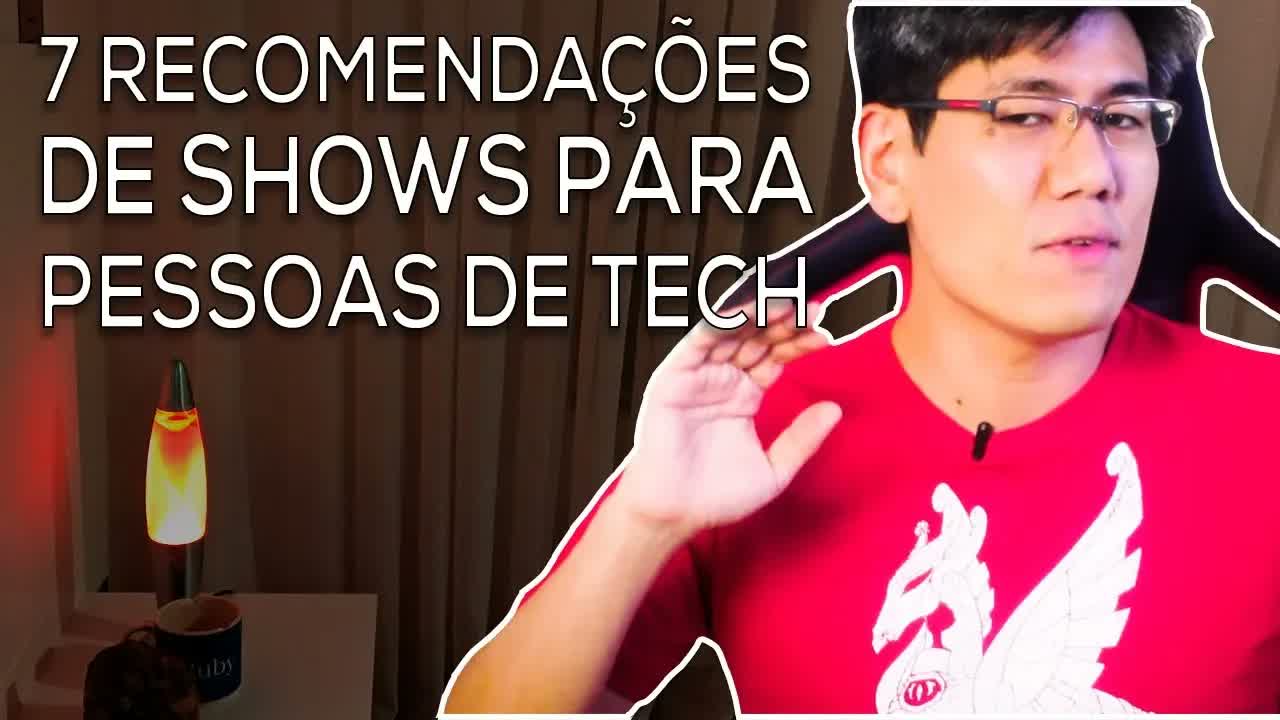
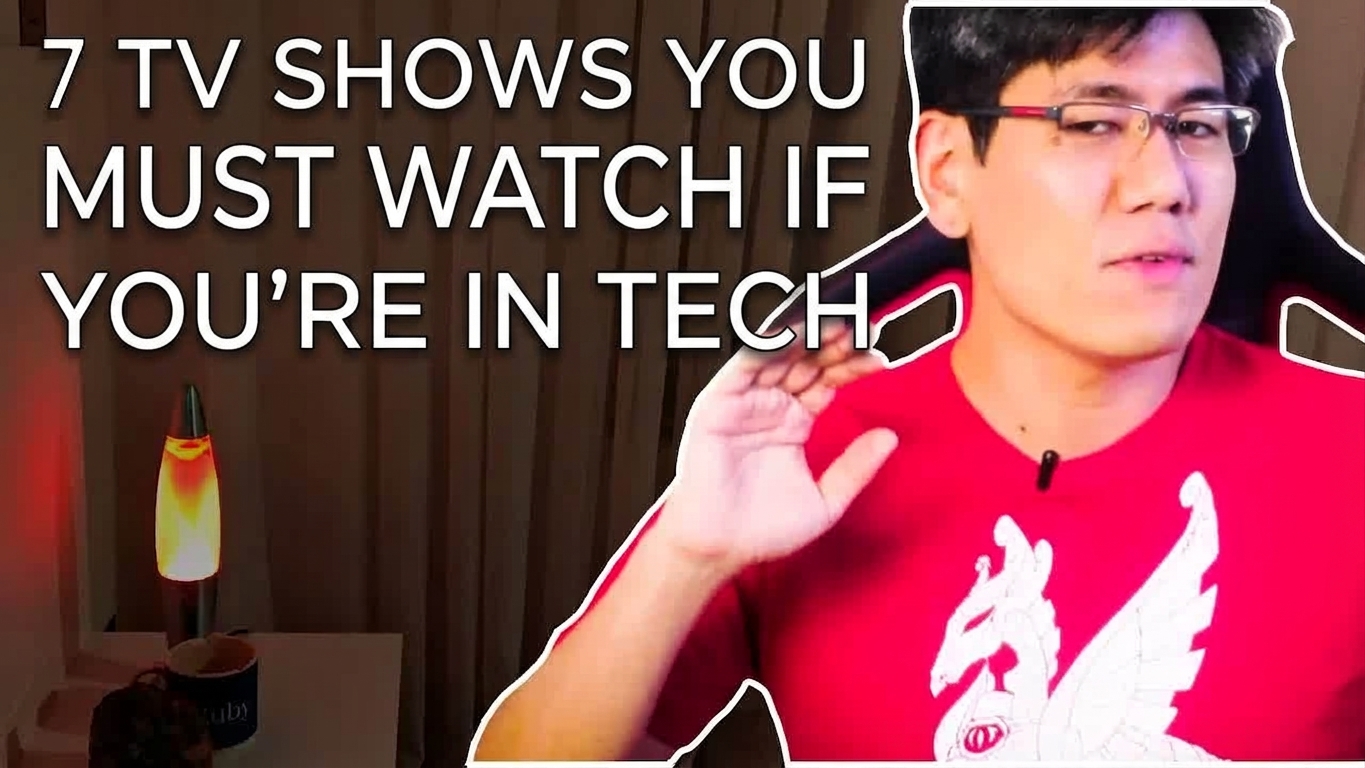

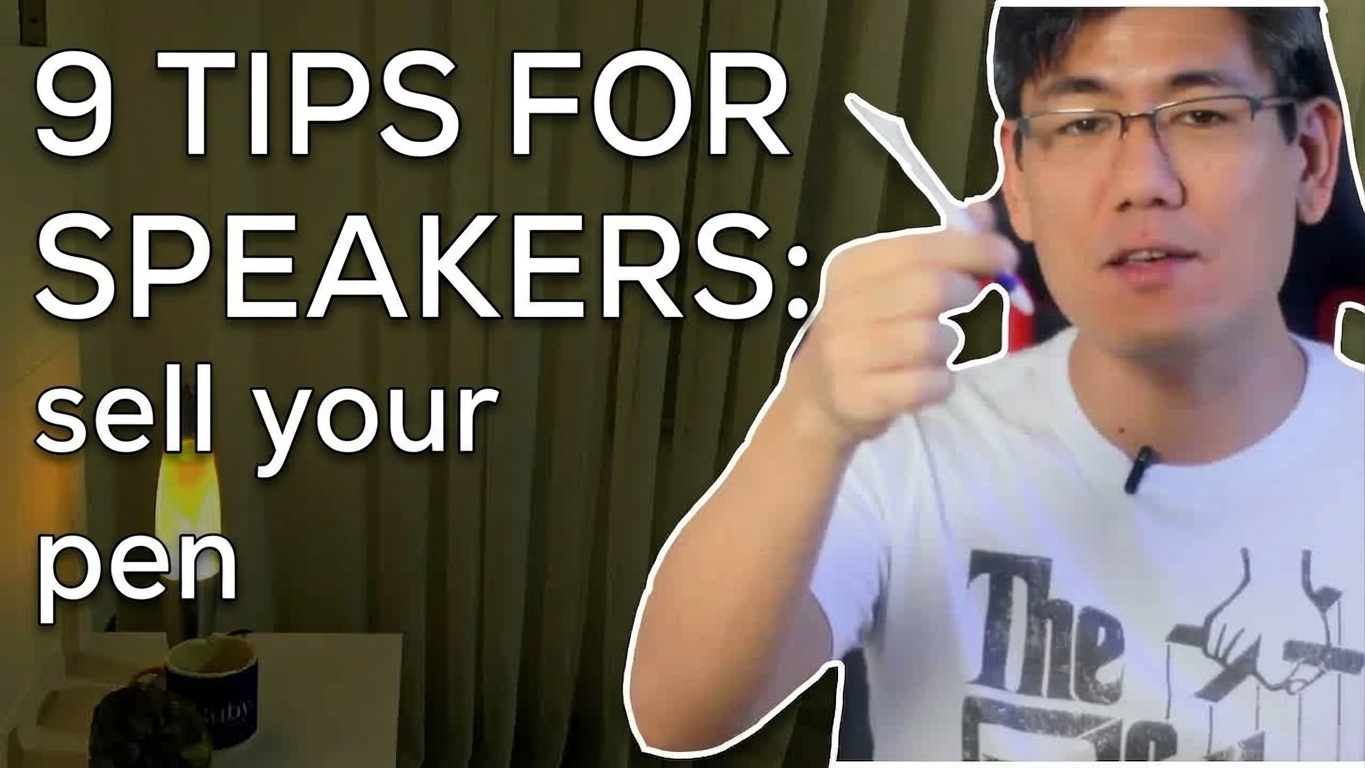
Notice the detail on episode 10. The model didn’t translate “7 Recomendações de Shows para Pessoas de Tech” literally into “7 Show Recommendations for Tech People” the way Google Translate would. It rewrote it as “7 TV Shows You Must Watch If You’re In Tech”, the way an actual American tech YouTuber would headline the video. The rest of the image stays pixel-for-pixel identical. On episode 11, “9 DICAS PARA PALESTRANTES: venda sua caneta” becomes “9 TIPS FOR SPEAKERS: sell your pen”, with the font, all-caps treatment and position preserved. If you didn’t know the original was in Portuguese, you couldn’t guess the second image is an automatic AI edit.
Cost on the Gemini side: a few cents per image, a handful of dollars total for the whole batch. Trivial next to the $1,500+ on the audio dub. With the thumbnail sorted, the channel’s English conversion is finally buttoned up — ElevenLabs v3 cloning the voice over hand-curated English .srt files, and Nano Banana Pro editing the image so the title matches the audio.
The conclusion, which is the title of this post
When Qwen3 TTS dropped, the hype was calling it an “ElevenLabs killer”. I spent weeks trying to live with that premise in practice, with real content shipping every week. And what I found is that open source TTS is still miles behind ElevenLabs. The gap is large, and it’s a gap that shows up precisely when you step off the 5-second demo tweet and put the model to work on a real 30-minute weekly podcast.
In practice, Qwen3 doesn’t even beat ElevenLabs’ v2 model. v3, which is the current one, is still a step above v2. The prosody comes out better, the inline emotion tags work in Portuguese and English without effort, and the API stays up without you maintaining a server. The cost per character is a bit higher, but for my current volume it sits comfortably within budget and gives me back the hours I was spending on GPU babysitting.
The lesson here is the same one the LLM crowd is learning slowly. A 30-second demo tweet is one thing, production is a completely different thing. Open source has its niche, mainly when you have sensitive data that can’t leave the house, or when you have tons of idle GPU and little recurring budget. But for serious TTS use in a commercial product, here in April 2026, ElevenLabs is still untouchable. Qwen3 didn’t kill anyone.
And don’t forget: subscribe to The M.Akita Chronicles on Spotify so you don’t miss new episodes like this one, made with the new pipeline.