Akita's AI Tips and Toolkit: ai-jail, ai-memory, ai-usagebar
In last week’s post, “Wrapping Up My AI Marathon: Success or Failure?”, I closed the first phase of my marathon. More than 600 hours of heavy coding-agent use, dozens of projects, hundreds of thousands of lines of code and documentation, and a pile of practical conclusions. Not marketing. Practical.
I’ll repeat something important before someone starts cloning all my repositories thinking they are 1.0 products: most of the frank-* projects on my GitHub are proofs of concept. Experiments. Some work well for me, in my environment, in my workflow. That does not mean they are ready to become a critical dependency in your company tomorrow morning. Want to play, contribute, study? Great. Just don’t confuse “I published it on GitHub” with “this is production ready.”
There are exceptions. FrankMD, for example, received a decent amount of contributions, tests, polish, real bug fixes, real use. Today it is much more stable than it was in the first post. Still, the point stands: these projects were born as a vibe-coding lab, not as a 3-year product plan with roadmap, enterprise support, and SLA.
This post is a roundup of what I learned in that lab. A few of my tools, a few habits, a few recommendations. Nothing mystical. No “revolutionary new way to program.” Old engineering with new tooling.
First: stop collecting agents
If you are a normal developer, you do not need 12 agents, 40 wrappers, 7 orchestrators, and a Kubernetes diagram to choose who gets to write an if.
In practice, focus on Claude Code, Codex, or opencode. That’s it.
Yes, Gemini CLI exists. Yes, Cursor exists. Yes, Windsurf, Crush, OpenClaw, Pi, Aider exist, and tomorrow another half-dozen will show up. I tested a bunch. Read my LLM benchmark posts, especially “LLM Benchmarks Part 3: DeepSeek, Kimi, MiMo”. The conclusion is boring and obvious: today, the best cost-benefit options for heavy programming are Opus 4.7 and GPT 5.5 on subsidized Pro/Plus/Max plans. Nothing comes close when the job is spending several hours a day with a real coding agent.
Paying directly for tokens is expensive. Paying for a subsidized monthly plan is much cheaper. That’s why I keep alternating between Claude Code and Codex: not because I want “multi-agent architecture,” but because the plans have limits and I work many hours in a row.
Are DeepSeek v4 and Kimi 2.6 cheaper? Yes. Are they usable? Yes. I like them for several cases. But for Agile Vibe Coding the way I’ve been advocating since “From Zero to Post-Production in 1 Week”, they are still lacking. They stumble more on continuity, long refactors, tests, understanding the whole project. Can you use them? Sure. But if the goal is consistent productivity, Opus and GPT are still the bar.
Running an open-source model locally is neat. I played with that a lot in the Minisforum MS-S1 Max with AMD AI Max+ 395 review. For one-shots, studying, playing with local inference, it’s fun. For Agile Vibe Coding all day, every day, it is still not practical. Latency, context, quality, setup maintenance, VRAM, all of it collects tax.
Running multiple LLMs in parallel is not practical either, the whole “planner + executor + reviewer + judge” routine. I tested that in “LLM Benchmarks: Is It Worth Mixing 2 Models?”. The idea looks nice on paper. In practice, it increases cost, latency, error surface, and the gain does not pay for the complexity.
The secret is not having a bunch of agents. Forget OpenClaw or Pi for day-to-day programming. The secret is engineering process. XP. Tests. Clean Code for AI Agents. CI. Pair programming. Constant refactoring. Small code. Automated deploy. Fast feedback.
Tools help. Engineering wins.
ai-jail: autonomy with a fence
The first project I want to highlight is ai-jail. It is a sandbox wrapper to run AI agents with restricted system access. On Linux it uses bubblewrap (bwrap) and Landlock. On macOS it uses sandbox-exec. The idea is simple: the agent sees the environment it needs to work, but does not go rummaging through your whole system.
Do I use it every day? Yes. Do I use it always? No.
When I know I am not doing anything risky, I open claude or codex directly. If I am touching a simple project, just running tests, editing markdown, refactoring local stuff, often I do not bother. In more than 600 hours of intense Agile Vibe Coding, more than half a million lines of code and documentation, I never had one of those folklore cases of an LLM destroying my host system in some unrecoverable way.
And look, I explicitly used agents to configure my Omarchy. ZSH, Hyprland, Waybar, terminal configs, login scripts, all of it. They never did anything I did not ask for.
Those stories of “the agent deleted my whole home by itself” make me raise an eyebrow. In my experience, when you ask it to delete something dangerous, Claude and Codex ask for confirmation. You have to say yes. If you said yes without reading, that is not LLM black magic. That is user in zombie mode.
Nothing is guaranteed, of course. Hence ai-jail.
My favorite use is combining ai-jail with the harness’ no-brakes mode:
ai-jail claude --dangerously-allow-permissions
ai-jail codex --dangerously-bypass-approvals-and-sandbox
It sounds contradictory, but it makes sense. I remove the confirmation friction inside the agent, but put a fence at the operating-system level. The agent can work fast inside the project, but the host filesystem is essentially read-only. The current directory is read-write. Whatever I explicitly map with --rw-map is also read-write. The rest is not to be touched.
The ai-jail README sums it up well: it is a sandbox wrapper for agents like Claude Code, GPT Codex, OpenCode, and Crush. On the first run it creates a .ai-jail in the project, which can be committed. It supports --dry-run to see mounts before executing, --lockdown for a stricter mode, --private-home to hide real dotfiles, --mask .env to hide sensitive files inside the project itself, and isolated browser profiles for Chromium/Firefox.
Do not sell this as absolute security. Process sandboxing is not a VM. Kernel bugs exist. Side channels exist. macOS has limitations. The README itself is clear: if you need to isolate a truly hostile workload, use a disposable VM. I do not use ai-jail as “military-grade armor.” I use it as another layer, good enough for a development workflow.
And even inside the project, everything is Git. I push frequently to GitHub or to my private Gitea. So the realistic worst case is the agent destroying the project directory. Annoying? Yes. Catastrophic? No. I clone again. I come back from the remote. I redo what was local. If .git gets corrupted, I delete everything and clone again.
Secrets also have a copy outside. .env, tokens, keys, everything that matters sits in Bitwarden. Self-hosted in Vaultwarden, of course. So if I lose the local directory, I did not lose the keys to the kingdom.
The most common risk is not the agent deleting everything. It is you leaking a secret to Git. That happened to me more than once. You run git add ., forget a .env, push to the remote, congratulations. It happens. That’s why you must look at git status, git diff --cached, and think before pushing.
Even when it happens, LLMs are very competent at helping rewrite history. I ask them to clean the secret from Git, force-push, review that it disappeared, and then I rotate the key. It is not pretty, but it is manageable.
So yes, I recommend using Claude/Codex with dangerous permissions inside ai-jail. Is there a 0.001% chance of an unrecoverable accident? There is. But if you are a good engineer, that should not kill you. I have layers: automatic Btrfs snapshots, restic to my NAS, NAS archiving offsite to AWS Glacier, remote Git, Bitwarden. No tool replaces backups.
ai-memory: context that survives the harness
The second is ai-memory, which I explained in detail in “I Built a Memory System for Coding Agents: ai-memory”.
The motivation is simple: harnesses lose context. Claude Code compacts. Codex compacts. opencode compacts. The session ends. You open another agent and it does not know what happened in the last 4 hours. If you only use one harness, maybe it does not bother you much. If you alternate between Claude and Codex like I do, it gets annoying fast.
I wanted a long-term memory consolidator that worked across different harnesses. Something that allowed handoff between Claude, Codex, and opencode without me manually writing HANDOFF.md every time. Something that captured prompts, tool calls, and session events through hooks, consolidated them into markdown pages, indexed with SQLite/FTS5, and exposed everything through MCP when the agent needed to query it.
Another motivator was what I explained in “Is RAG Dead? Long Context, Grep, and the End of the Mandatory Vector DB”. For code projects, simple text almost always solves more than fancy vector DB architecture. Markdown, grep, SQLite FTS5, long context, and good files in docs/ already take you far. ai-memory follows that line: compile memory into text, leave it on disk, index it simply, and only call an LLM when consolidation is worth it.
ai-memory was not made to be a user-browsable knowledge base. It has a read-only web UI, yes, but that is for auditing and inspection. The memory is optimized for LLM consumption. It is an internal wiki the harness can query when it thinks it needs to. It is a place where I can explicitly ask “save this for the next session” and expect it to survive longer than Claude or Codex’s default compaction.
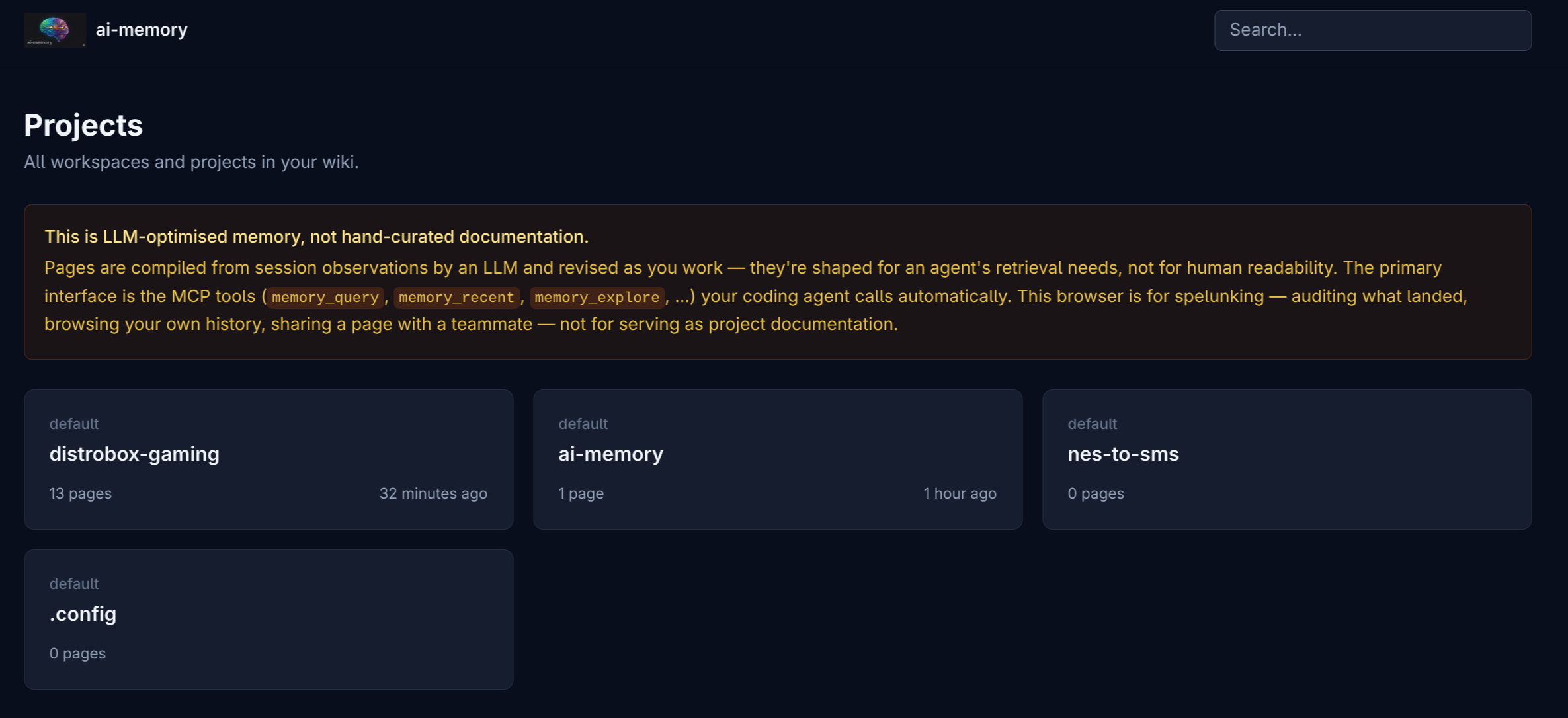
The README sums it up well: coding agents lose all context when the session ends; ai-memory gives them a shared persistent wiki. Every prompt, tool call, and decision can be captured automatically. At the end of the session, relevant pages are rewritten as coherent narrative. In the next session, another agent can receive a handoff already prepended into the context.
This is useful when you close Claude at 6pm, open Codex the next day in the same directory, and want it to know you were testing session cookies because JWT rotation had run into trouble. Or when you return to a project six weeks later and do not remember why you discarded Redis.
But do not confuse it with canonical documentation. If you did important research you do not want to lose, ask the agent to write markdown in docs/ inside the project. Architecture decision, benchmark, library analysis, deploy runbook, anything that must survive with guarantees should become an explicit file in the repo. That is simpler, auditable, and versioned.
ai-memory covers the middle band: transient information that might matter later. A weird bug that appeared. The reasoning that led to a decision. An environment gotcha. A session summary. Things you do not want to turn into official docs yet, but also do not want to throw away.
It is still beta. I use it in personal production, but it needs many more users beating on it. The most polished integrations today are Claude Code, Codex, and opencode. Gemini CLI, OpenClaw, and exotic MCP clients still need more testing. PRs are welcome. Bug reports too. “I installed it and it broke on my setup” is exactly the kind of feedback that reveals a wrong assumption.
ai-usagebar: knowing when to switch horses
As I said above, I prefer using Anthropic and OpenAI’s subsidized plans. The problem is that if you do real Agile Vibe Coding, you hit limits. Daily limit. Weekly limit. Session limit. Limit that changes. Limit that does not show up clearly anywhere.
I was using claudebar, which is good, but only covers Claude. I wanted to see the main vendors in one place. That became ai-usagebar, which I introduced in “I Built a Waybar Widget for Omarchy to Monitor LLM Plan Usage: ai-usagebar”.
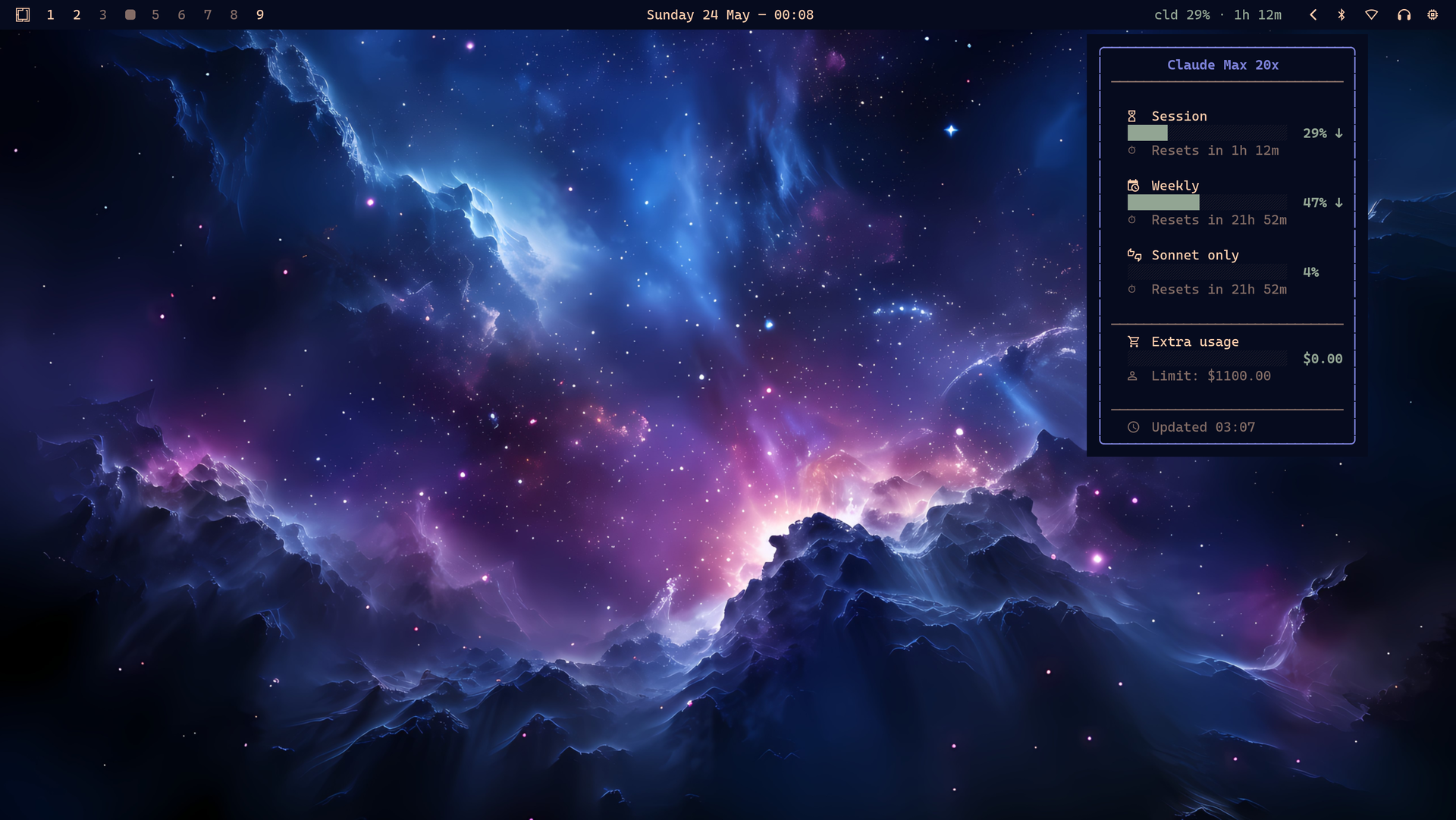
It is a Waybar widget and Rust TUI to monitor Anthropic Claude, OpenAI Codex/ChatGPT, Z.AI GLM, and OpenRouter usage. For Claude and OpenAI, it reads the OAuth credentials the official CLIs already wrote. For Z.AI and OpenRouter, it uses API keys. It shows session percentage, reset, limits, balance, and lets you switch the primary vendor.
The value is banal and therefore useful: I glance at the bar and know whether I should continue in Claude, hand off to Codex, or top up OpenRouter credit. I do not want to discover I hit the weekly limit in the middle of a large refactor.
There is also a standalone TUI:
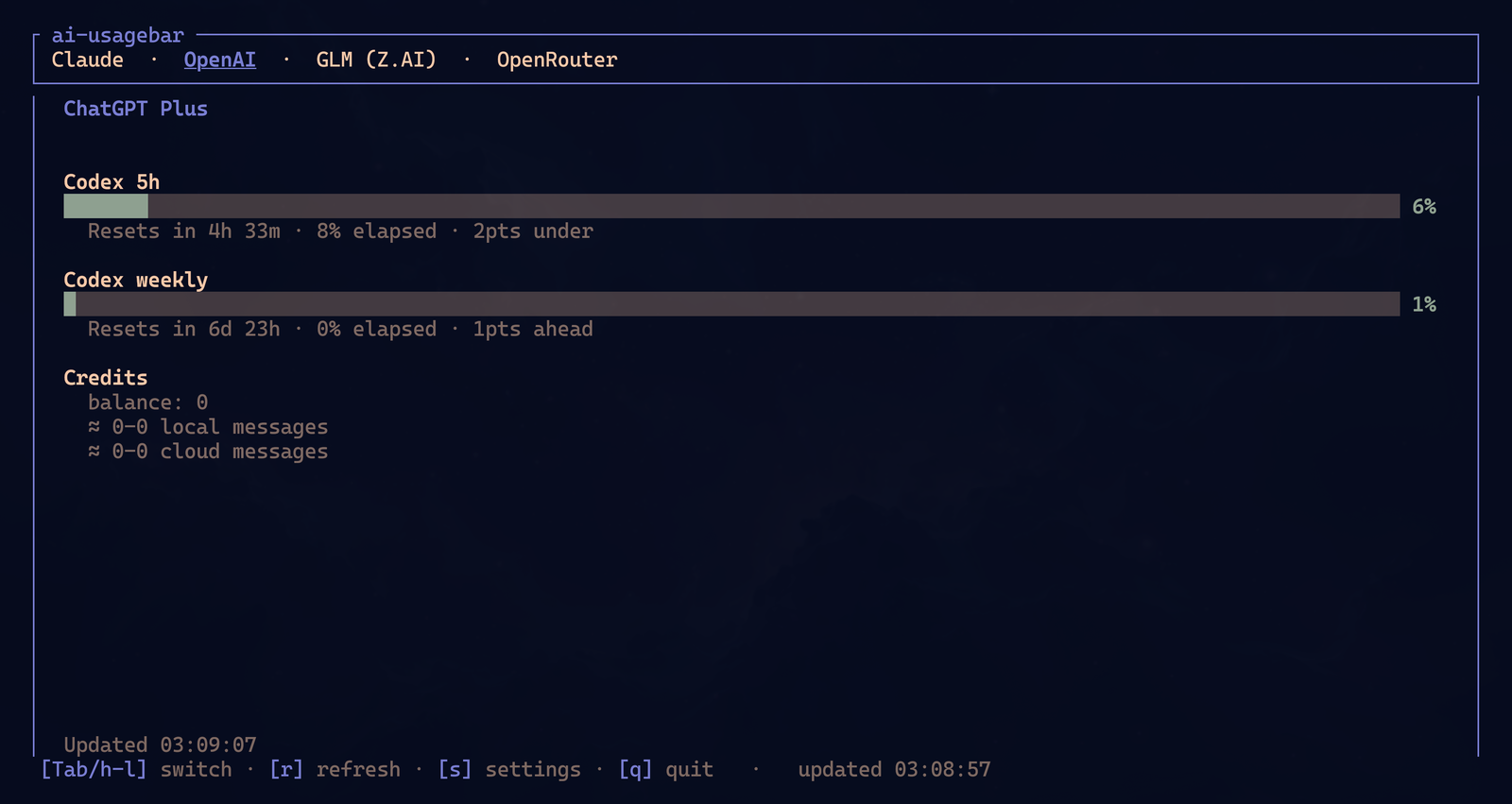
If you do not use Omarchy, Hyprland, or Waybar, you can still run ai-usagebar-tui in any terminal. SSH, tmux, normal terminal, whatever. The bar is convenience. The TUI is the universal form.
ghpending: GitHub pending stuff without the ritual
After the marathon, I ended up with dozens of ai-* and frank-* repos on GitHub. That creates an annoying problem: issues and pull requests start appearing. A contributor opens a PR. Someone reports a bug. Someone else sends a suggestion. If I have to open the browser, enter repo by repo, filter tab by tab, I will postpone it. And if I postpone it, I go weeks without answering contributors.
Yes, I could use gh, the official GitHub CLI. I do use it. But I wanted something dumber and faster: a short command to print a digest of everything pending in the repos I chose to monitor. That became ghpending, which I described in “I Built a CLI to Check My GitHub Pending Stuff: ghpending”.
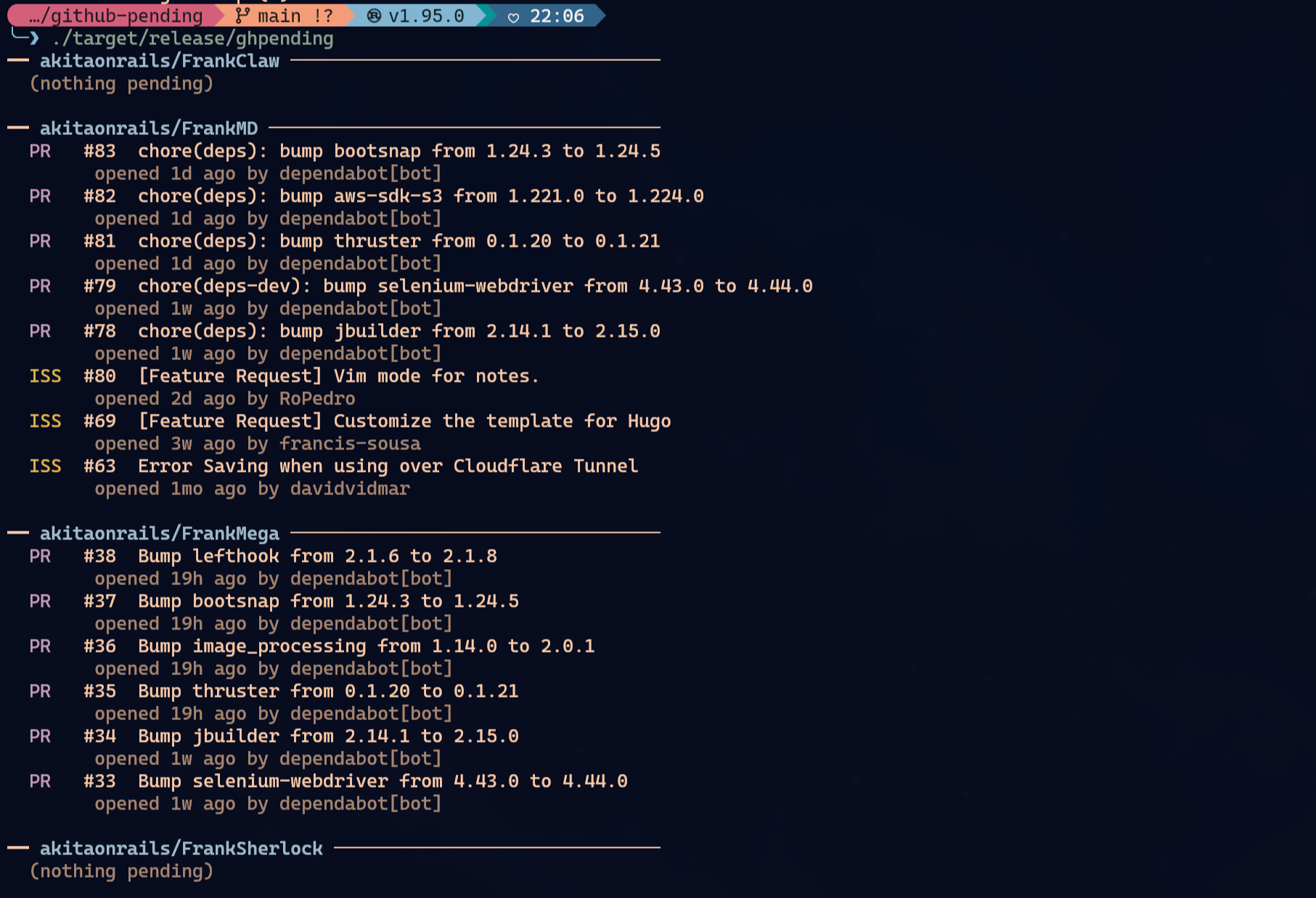
That is it: ghpending add to choose repos, ghpending to see the digest, ghpending list, ghpending rm. Without auth it works with GitHub’s 60 req/h anonymous limit. With GITHUB_TOKEN=$(gh auth token) ghpending, it goes up to 5,000 req/h.
The point is not replacing GitHub. It is reducing friction. If I can run one command in the terminal and see “there are 3 PRs and 2 issues to look at,” I look. If it depends on browser ritual, notifications, and tabs, it waits.
And Claude/Codex are very good at this kind of work. You can ask:
“Check the open pull requests, review the code, see if it compiles, run the tests, add tests if missing, rebase from master if needed, merge and close.”
Or:
“Check the open issues, evaluate whether there is a real bug, reproduce it if possible, propose a fix, answer the user.”
They read the PR, understand the diff, run tests, rebase, solve simple conflicts, write the contributor response. You still keep your brain on. You are delegating mechanical work you already know how to do.
Refactoring: ask explicitly, several times
Claude and Codex are very good at refactoring, but do not assume they will do it automatically the way you would. I usually start projects or features with explicit instructions:
“Use Rust best practices. Avoid unnecessary duplication. Modularize only where it makes sense. Add unit tests for every new feature. Follow Clean Code principles. Do not create an abstraction before it is needed.”
After a large feature, a large fix, or a few hours of development, I stop and ask:
“Now that we touched a lot of code, re-evaluate it carefully. Delete dead code. Refactor obvious duplication. Add missing tests. Remove magic numbers. Check if any modules are too large. Do not change behavior without tests.”
Before release:
“Before publishing this version, do a sanity audit. Look for secret leaks, dangerous permissions, destructive commands, path traversal, unnecessary unwraps, missing validation, and anything that looks like an obvious vulnerability.”
Does that guarantee security? Of course not. Not even close. But it removes a lot of dumb mistakes. It is another layer. I like running this audit with Claude and then with Codex, because each one finds different things. Bugs still pass. Security is process, not a magic ritual.
Disposable experiments: code got cheap
Before choosing a library, framework, architecture, model, or service, I like creating experiments/.
Example:
“Before choosing between Qwen and DeepSeek, create a disposable prototype in
experiments/for an A/B test. Document the analysis indocs/with result, cost, latency, quality, and recommendation.”
This changed how I decide. Before, many engineering decisions became opinion, feeling, faith in somebody else’s benchmark. Now code is cheap. I ask the agent to make two or three versions, run tests, measure, document, throw away what does not work.
Prototyping got genuinely fast. Frank Karaoke is a good example: turning YouTube into a karaoke app was the kind of idea I would maybe leave in a mental list for months, waiting for “a free weekend” that never arrives. Now I can open experiments/, ask for a rough prototype, test the technical path, and decide whether it deserves to become a project. Look at my other 2026 posts about frank-* and ai-* projects: almost all of them started like this, as disposable code that proved something before earning a name.
But cheap prototypes do not mean one-shot. I already wrote in “Why LLMs Aren’t Giving You the Result You Expect”: a good prompt is an iterative conversation. You provide context, show references, point out constraints, read the result, correct direction, ask for a rewrite. If you throw in a vague sentence and expect a finished product, that’s on you.
I learned this by taking a beating too. In the Frank Yomik post I described my first real vibe-coding failure: when the direction is wrong, insisting on the same prompt just digs the hole deeper. Sometimes you need to reduce scope, isolate the problem, create a test, change strategy. LLM does not turn a bad plan into good engineering.
And there are domains where you need to study along with it. In the DriveClub and shadPS4 post, AI almost sent me in every wrong direction because the problem required understanding rendering, gamma, shaders, buffers. The tool helps you explore, but you still decide whether the explanation makes sense. If you do not understand enough to verify, you are just accepting a pretty guess.
That is also why I keep repeating the idea from “Software Is Never Done”: deploy is not the finish line. The prototype becomes a product when it handles bug reports, maintenance, refactoring, docs, releases, rollbacks, users complaining. LLM helps a lot with that boring cycle. But the cycle still exists.
If it is testable, test it. If it can be measured, measure it. If it cannot be measured, at least write down the assumptions. The important thing is not choosing just because it “seems better.”
Cheap code also means detachment. Make code to throw away. Make an ugly prototype. Make a disposable benchmark. Ask the agent to document what it learned in docs/decision-qwen-vs-deepseek.md, then delete experiments/ if you want. The document stays. The lesson stays.
LLMs are also very good at documentation. Use that. Ask it to document everything. Why we chose PostgreSQL instead of SQLite in this case. Why the deploy uses a multi-stage Docker image. Why the service runs behind Cloudflare Tunnel. Why that sysctl exists. Even if you delete half of it later, the cost of writing fell near zero.
Automated deploy or you will stop maintaining it
Every project of mine that matters has automated build. Many run in my homelab, as I described in “Migrating my Home Server with Claude Code”. Almost every project has a bin/deploy that builds a Docker image, pushes it, rotates it on the server, applies migration if needed, and validates healthcheck.
Claude and Codex are excellent at deploy. They read bin/deploy, understand Dockerfile, edit GitHub Actions, adjust release workflows, fix binary signing, update Homebrew taps, generate checksums. And yes, I ask Claude/Codex to SSH into my homelab and redeploy Docker containers. They are very good at that. ai-jail, for example, has GitHub Actions to build signed binaries for Linux and macOS.
If you have dozens of projects, the more automated the better. I rarely type admin commands in the terminal by myself. I ask the LLM to do it, observe, approve what is dangerous, and then ask:
“Document what was done and why it was done.”
This applies to the homelab and my workstation. My Omarchy is customized through Claude: ZSH, Hyprland, Waybar, scripts, shortcuts, themes, integrations. Even my gaming/emulation setups fall into this, as I showed in the retro racing games running on Distrobox post. This is a case where I normally do not use ai-jail, because I actually want to touch the host. So I look at commands, read diffs, approve slowly. Even then, I never had the agent break my system in an unrecoverable way. Quite the opposite. My PC has never been more stable and documented.
Days later, when I forget why I configured something that way, the context is in markdown, Git, ai-memory, or the project history itself. I can ask and the agent has something to pull from.
Even this post was written this way
This is how I write these posts now. I dump a huge messy block from my brain into Claude. I ask it to read recent posts to calibrate style. I ask it to check the projects directly and elaborate the technical parts. I ask it to use the latest screenshots, upload to S3 when needed, link previous posts, review the tone.
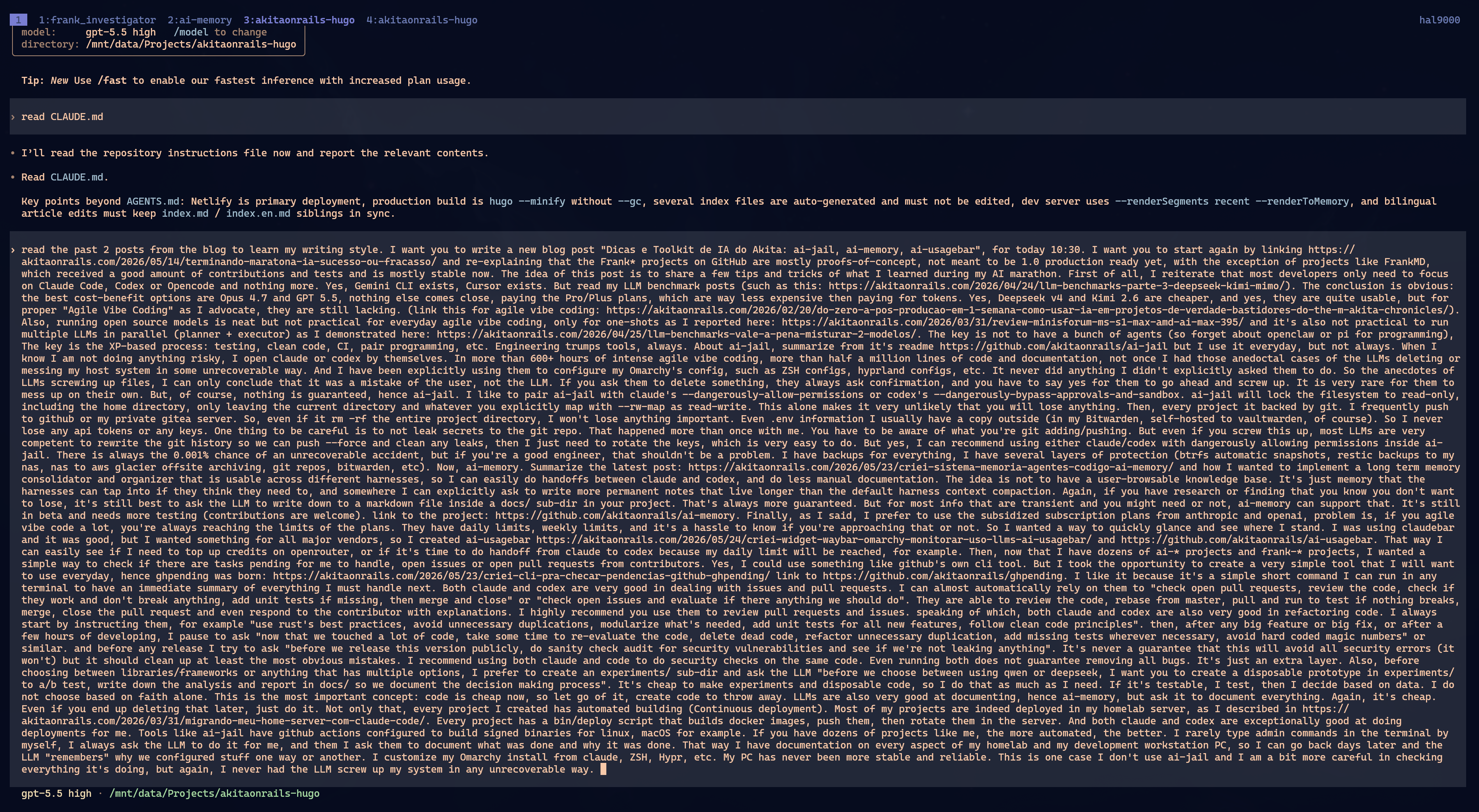
Then I read and edit. I cut what sounds generic. I replace sentences that sound like release notes. I put my rants back in. The result is still my text; I just spend energy on what matters: deciding what to say, correcting nuance, cutting nonsense.
“But did you test Pi?”
Every time I mention an LLM or LLM tool, someone shows up in the comments with the same question: “but did you test Pi?”, “but did you test DeepSeek?”, “but what about Qwen?”, “but what about the new model that came out yesterday?” Every. Single. Time.
It is annoying as fuck. And almost always it comes from three kinds of people: someone who tested nothing and wants to outsource the work, someone who already chose a tool and wants me to validate their choice, or a fanboy treating an LLM vendor like a soccer team. They all sound the same. NPC repeating tutorial dialogue.
Software engineers should not decide based on other people’s opinions. Not even mine. If you choose a tool because “Akita said so,” you understood it wrong. I advocate Claude Code and Codex because I used them for hundreds of hours, in real projects, publishing code and post-mortems of what worked and what failed. And even then I did not stop at opinion.
I built my own automated benchmark: llm-coding-benchmark. I update it when a popular vendor releases a new version. I run comparable scenarios. I publish results. Then I adjust my opinion based on the data. That gives me enough ground to say that, in my workflow, Opus and GPT keep winning. Not because I woke up wanting to defend some billionaire company’s logo.
If your first reaction was “but did you test Qwen?”, great. Test it yourself. Run the benchmark. Create a better scenario. Send a PR. Show numbers. Show cost. Show latency. Show where it failed. Show where it won. Bring new data.
Loose opinion is irrelevant. “It works for me” does not scale. “I like it better” does not matter. “In my one-shot prompt it was better” is an anecdote. Engineering starts when something can be reproduced, compared, and acted on.
So it is simple: bring actionable data or shut the hell up. I do not need vendor fan clubs in the comments. I need people testing, measuring, and contributing new results.
Final checklist
Short summary, because this post is already long:
- Focus on Claude Code, Codex, or opencode. Stop collecting agents.
- Use Opus 4.7 and GPT 5.5 through Pro/Plus/Max plans when daily productivity matters.
- DeepSeek, Kimi, and local models are useful, but still do not replace the main workflow.
- Agile Vibe Coding is XP with LLM: tests, Clean Code, CI, pair programming, and deploy.
- Use
ai-jailwhen you want agent autonomy with a filesystem fence. - Combine
ai-jailwith dangerous Claude/Codex permissions when the project is protected by Git. - Have real backup: Btrfs snapshots, restic, NAS, offsite, Git, Bitwarden.
- Review
git add,git diff --cached, and pushes so you do not leak secrets. - Use
ai-memoryfor transient context and handoff between agents. - Write canonical documentation in
docs/when information needs to survive with guarantees. - Use
ai-usagebarto know when to switch from Claude to Codex, or when to top up OpenRouter. - Use
ghpendingso you do not abandon issues and PRs. - Ask for refactoring explicitly after large features.
- Run a security audit before release, preferably with more than one model.
- Create disposable prototypes in
experiments/before deciding by faith. - If you disagree with a benchmark, run llm-coding-benchmark and bring new data.
- Document decisions in markdown. Code got cheap. Documentation too.
- Automate deploy. If it depends on a manual ritual, you will stop doing it.
In the end, it is the same advice as always: tools change, engineering does not. LLM increases leverage. If you already had good habits, you will produce more. If you did not, you will just produce mess faster.
And yes, this changes the interface of the work. I already wrote about that in “VS Code Is the New Punch Card”: polishing pixels in an editor is now old-programmer nostalgia. The hard part is writing intent correctly, reviewing execution without being lazy, measuring results, throwing away cheap code, and not confusing opinion with data.