I Built a Waybar Widget for Omarchy to Monitor LLM Plan Usage: ai-usagebar
Anyone following the blog already knows I use a whole bunch of different LLM vendors. The main ones are Claude and GPT, via Claude Code and Codex. I use each one’s harness because I’m locked into their subscription plans (Pro, Plus, Max), which come out way cheaper than paying per-token credits like OpenRouter. Even so, I also use OpenRouter to reach other models for testing, and I even have a Z.AI GLM subscription for small stuff.
The problem with juggling several plans is keeping track of how much I’ve burned on each. I’d been using claudebar, a Waybar widget that shows your Anthropic plan usage. I like it, but I wanted to see all my vendors in one place, glance at it and know where I stand. And I didn’t want to clutter my Waybar with a separate widget per vendor. So I built my own: ai-usagebar.
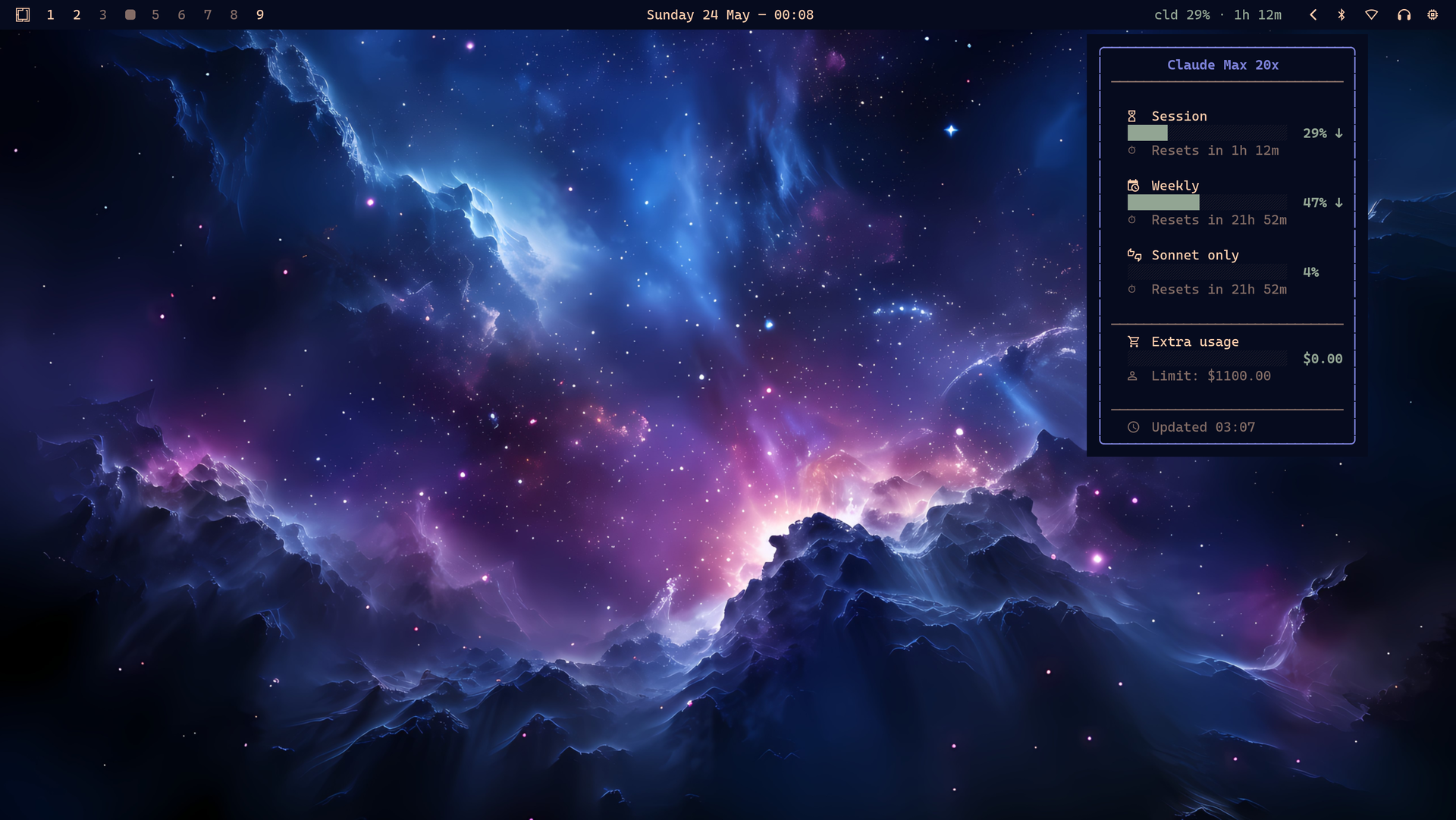
It’s a Rust port of claudebar, drop-in compatible, extended to four vendors: Anthropic Claude, OpenAI Codex/ChatGPT, Z.AI (GLM), and OpenRouter. It keeps the same flags (--icon, --format, --tooltip-format, etc.), the same minimalist Pango-bordered tooltip, and the same Omarchy theme auto-detection. The difference is that now all four vendors show up in the same place, instead of 865 lines of bash babysitting just one.
How it authenticates with each vendor
This is the part worth explaining, because each vendor does it differently. Claude and Codex use OAuth: their official CLIs (claude and codex) already wrote the credentials to disk when you logged in, and ai-usagebar reads those same files. No environment variable needed, the token even refreshes itself.
Z.AI and OpenRouter use API keys, so for those you need to set a key (via env var or inline in the config).
| Vendor | Method | What you need to do |
|---|---|---|
| Anthropic | OAuth, reads from ~/.claude/.credentials.json | Run claude once to log in. Token refreshes itself. |
| OpenAI | OAuth, reads from ~/.codex/auth.json | Run codex login once. Token refreshes itself. |
| Z.AI | API key (ZAI_API_KEY or [zai] api_key in config) | Set either one. |
| OpenRouter | API key (OPENROUTER_API_KEY or [openrouter] api_key) | Set either one. |
The interface beyond Waybar
Besides the widget on the bar, there’s a tabbed TUI (ai-usagebar-tui) to see everything at once. Navigate with Tab / h / l between vendors, auto-refresh every 60s. You can open it by clicking the Waybar widget, or run it straight from the terminal (more on that in the next section).
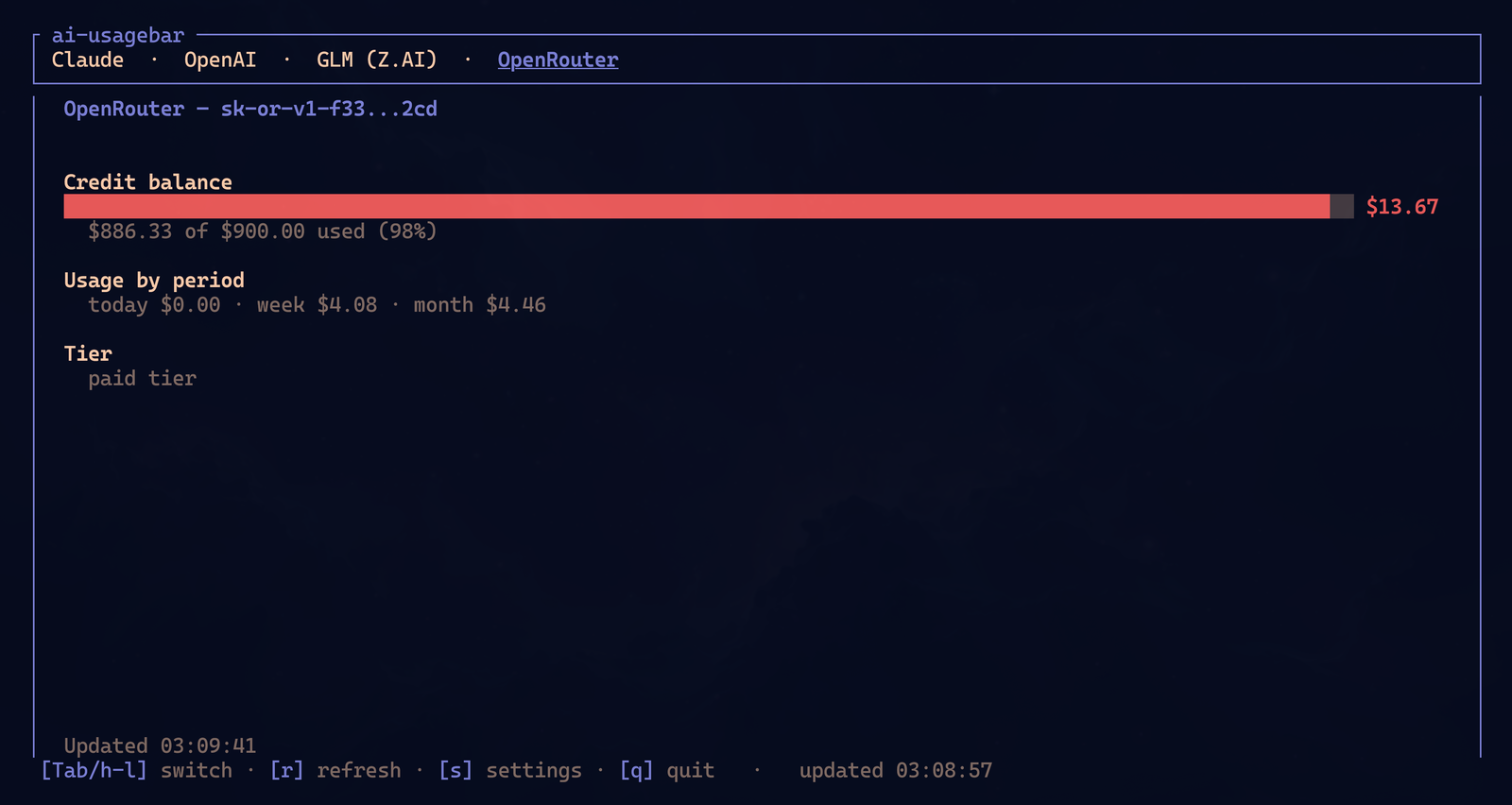
The OpenRouter tab shows credit balance, today/week/month spend, and the tier:
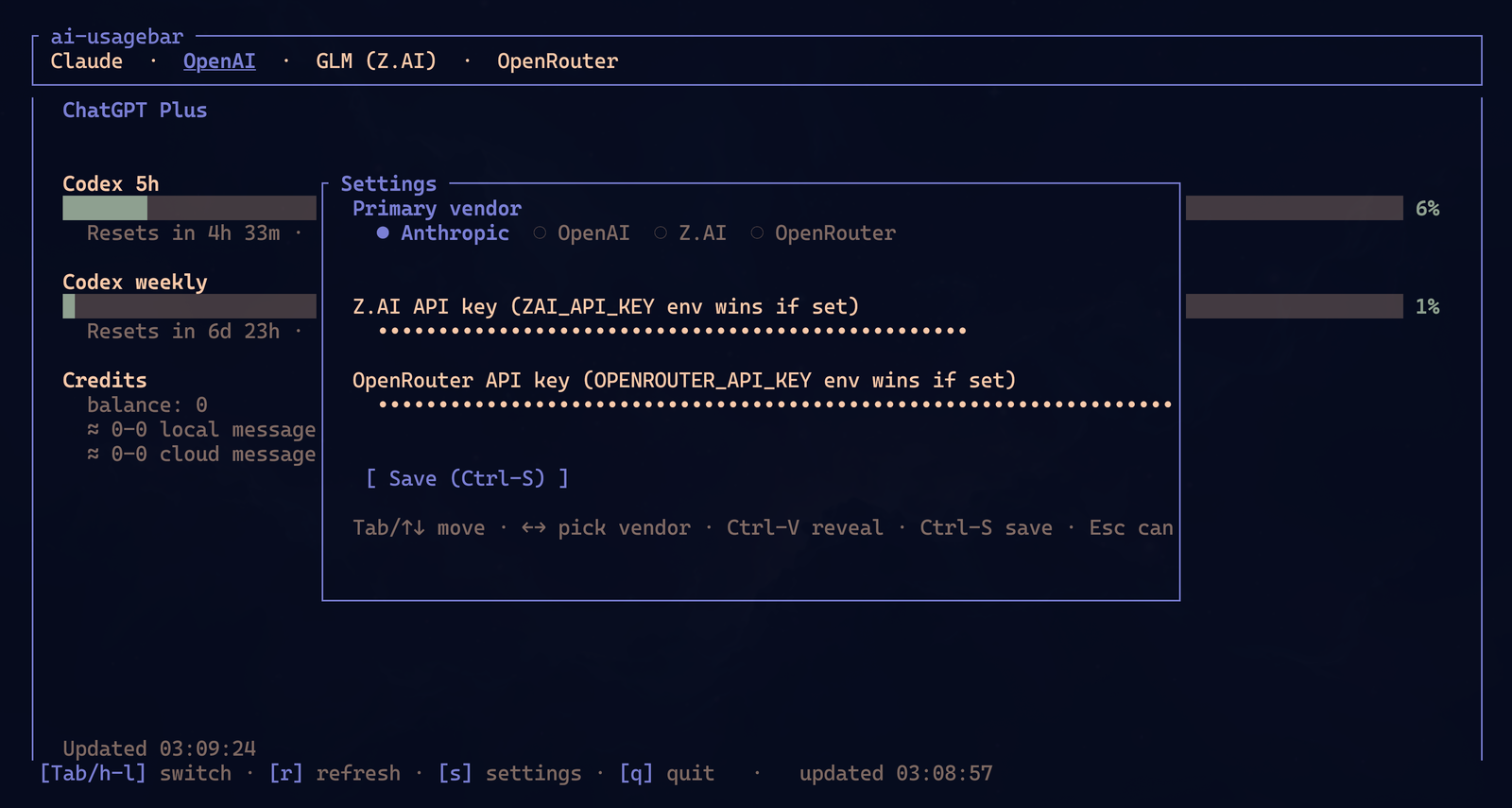
And there’s a settings overlay to pick the primary vendor and paste the API keys without editing the config by hand:
Not on Omarchy or Hyprland? Run it as a standalone TUI
The Waybar widget is optional. The two binaries are independent, so if you don’t run Omarchy, or Hyprland, or Waybar (or you just prefer to check usage now and then instead of having it on the bar all the time), ai-usagebar-tui works as a fully standalone terminal app:
ai-usagebar-tui # opens in your current terminalIt runs in any terminal emulator (Kitty, Alacritty, Foot, Ghostty, etc.), works even over a plain SSH session, and doesn’t depend on a compositor or any window-manager feature. All the controls and the settings overlay work the same. Same four vendors, same tabs:
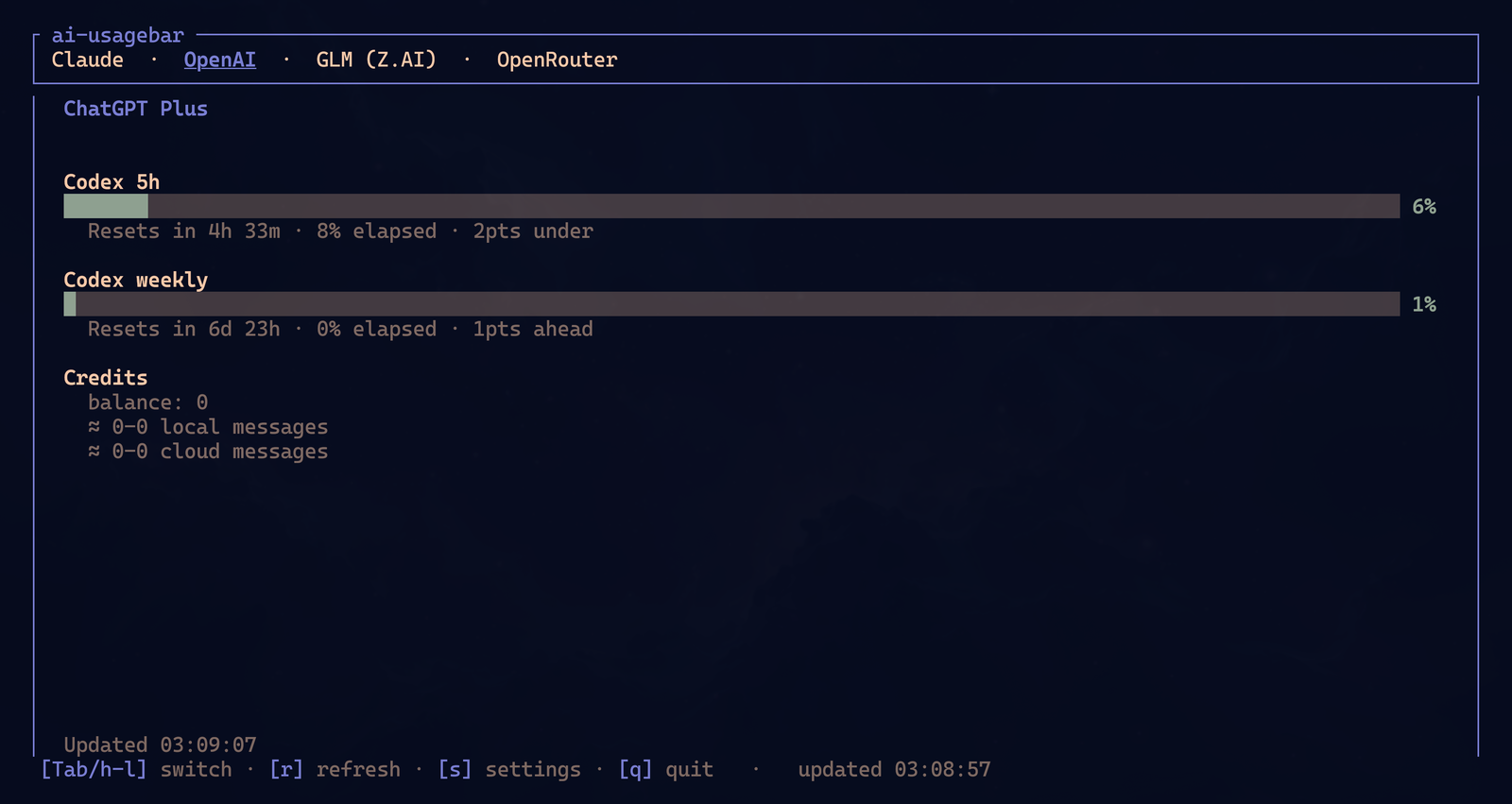
Typical use off Omarchy: a quick check before starting a long session (“am I close to my Claude weekly limit?”), a monitor in a tmux pane while you code, or a shell-only tool on a remote machine (install the binary and that’s it, no Waybar or Hyprland dependency). The TUI is the canonical way to see all four vendors at once, whether or not you ever set up the widget.
Install
On Arch there’s an AUR package, two flavors:
yay -S ai-usagebar-bin    # prebuilt binary from GitHub Releases (~5s)
yay -S ai-usagebar        # compiles from source (~30-60s)
Or straight from source:
cargo build --release
sudo make install                  # → /usr/local/bin
# or
make install PREFIX=$HOME/.local   # → ~/.local/bin
The recommended Waybar config is a single module you scroll to cycle through vendors, with click to open the TUI:
"custom/aibar": {
    "exec": "ai-usagebar --format '{vendor_short} {session_pct}% · {session_reset}'",
    "return-type": "json",
    "interval": 300,
    "signal": 13,
    "tooltip": true,
    "on-click": "ai-usagebar-tui",
    "on-scroll-up":   "ai-usagebar --cycle-next",
    "on-scroll-down": "ai-usagebar --cycle-prev"
}
If you’d rather see all four vendors at once, you can use one module per vendor. The README has the full config detail, format placeholders, and the variations.
Why I built it
This looked like a Saturday-night little project, so I just did it. And it was: porting claudebar to Rust and adding the extra vendors I wanted was painless. I came out of one night with a widget that does exactly what I needed and is more reliable (tested, modular) than the original shell script.
If you use other vendors I didn’t cover, or you hit a bug, send an issue or pull request: github.com/akitaonrails/ai-usagebar. It’s MIT.