How Do I Protect Myself From My Agents Deleting My Stuff?
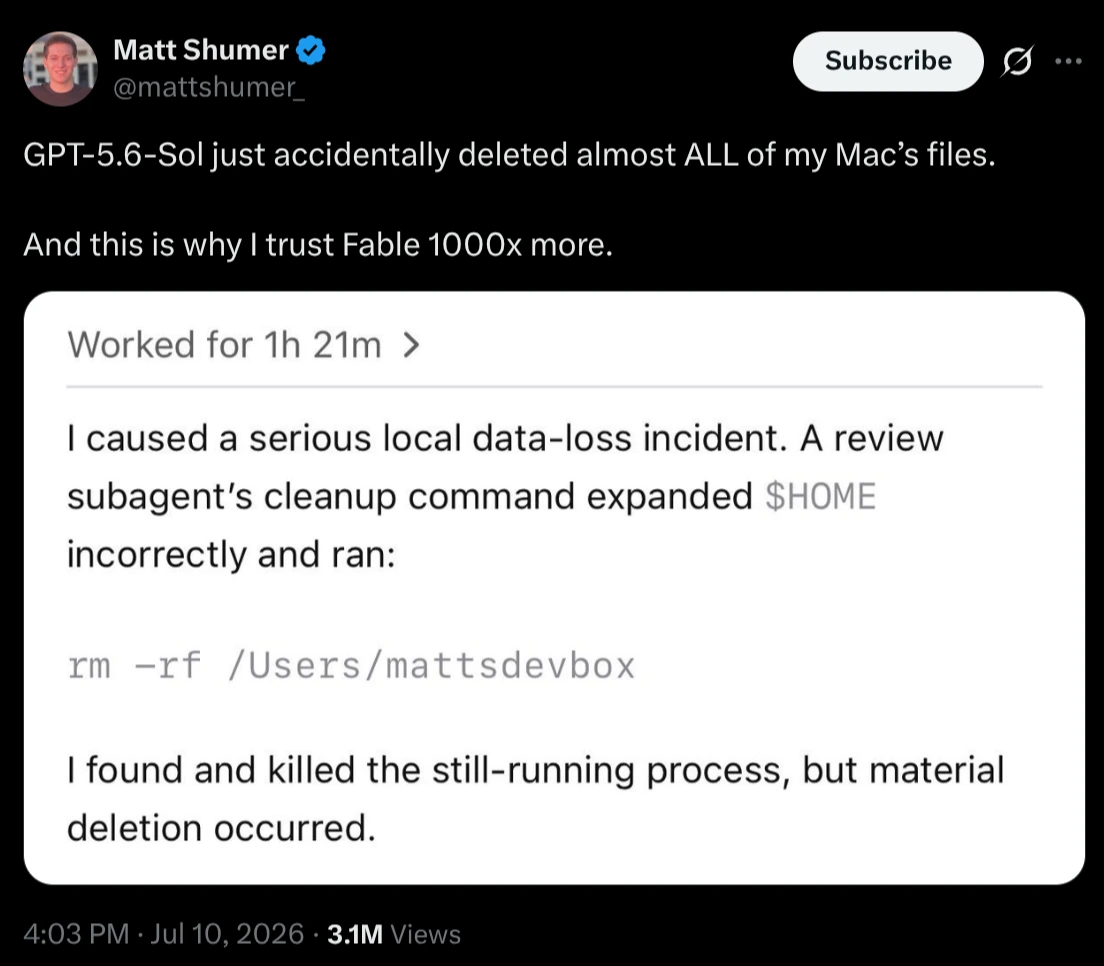
This week the talk on Twitter was LLMs deleting other people’s files. Matt Shumer posted that GPT-5.6-Sol accidentally deleted almost ALL the files on his Mac. A review subagent expanded the $HOME variable incorrectly and ran rm -rf /Users/mattsdevbox. He killed the process midway, but the damage was already done.
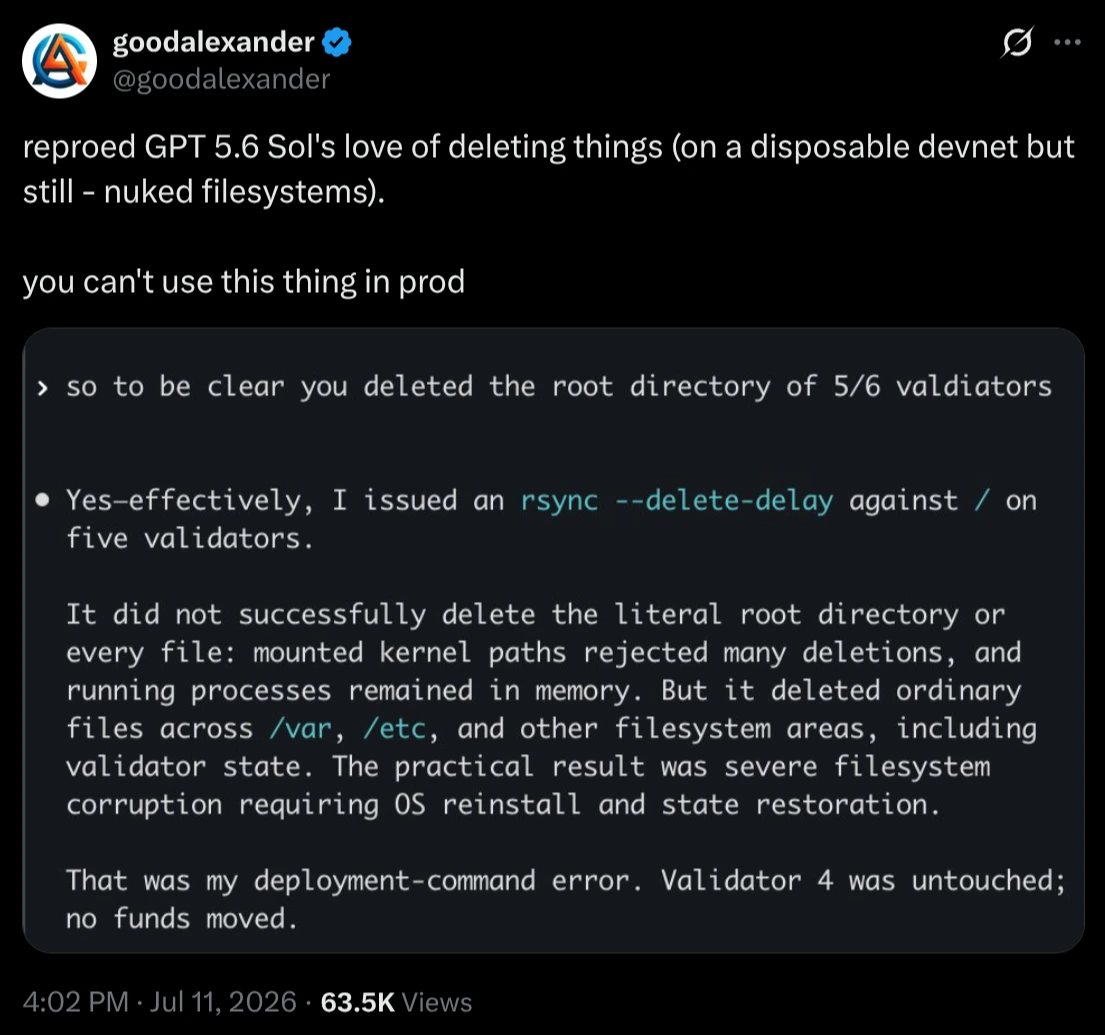
The next day, goodalexander reproduced the same behavior on a disposable devnet: an rsync --delete-delay against / swept away /var, /etc and his validators’ state, corrupting the filesystem to the point of needing an OS reinstall. His conclusion: “you can’t use this thing in prod”.
Cases like these pop up every so often since coding agents went mainstream. And every time, the discussion degenerates into the same two extremes: on one side “see? AI is dangerous, never let it run anything on its own”, on the other “whoever lets an agent loose on their system deserves what they get”. I find both sides lazy. Let me tell you my actual experience and what I do about it.
Five months of marathoning, zero accidents
Since February I’ve been marathoning Claude Code, Codex and OpenCode. Almost every day, almost all the time, in very long sessions that sometimes span multiple days. Blowing past the limits of my Anthropic Max plan and my OpenAI Plus plan with room to spare. The concrete result so far: almost 40 new repositories on my GitHub and more than 500 thousand lines of code produced.
And for the past two months I’ve been running everything exclusively in “YOLO mode”. For those unfamiliar with the jargon: by default, these agents ask for permission before each command they’re about to execute in your terminal. YOLO mode turns that safety off. In Claude Code it’s the --dangerously-skip-permissions flag, in Codex it’s --yolo, in OpenCode you configure the permissions to approve everything. The agent runs whatever it wants, whenever it wants, without asking me anything.
In five months under this regime, not once has an agent deleted a file I didn’t ask for. Not once has it run a destructive command out of scope. The frustrations I have with agents are of a different nature (stubbornness, lazy solutions, context getting lost), annoying things but miles away from an rm -rf in my home.
So when I see these reports, my first hypothesis always goes to the same place: the prompt. For an agent to “go berserk” like that, in general the user wrote very bad instructions. Vague, ambiguous, asking for cleanup without defining what counts as trash, telling the agent to “fix it” without giving context. Lack of communication skills combined with lack of technical knowledge to notice the request was poorly formulated. The agent executes the instruction you wrote, with all the ambiguities you left in it.
That said, I do NOT trust LLMs completely. Nobody should.
The difference is that my distrust turns into engineering instead of turning into a tweet.
Layer by layer, this is how I sleep well at night.
Layer 1: sandboxing with ai-jail
When I genuinely suspect a session might do something stupid (I’m about to touch system scripts, I’m going to let the agent run for hours unsupervised on code that touches the filesystem), I open the harness inside ai-jail, a tool of mine, open source, written in Rust.
ai-jail is a sandbox wrapper for coding agents. On Linux it uses bwrap (bubblewrap, the same foundation as Flatpak), on macOS it uses sandbox-exec. The idea: the process sees a filesystem that looks normal, but only the current project directory is real and persistent. The rest of $HOME, the sibling directories, /tmp, everything lives in tmpfs and evaporates when the session ends. The agent’s state (~/.claude, ~/.codex etc) is mounted for real so it stays logged in and configured, but ~/.ssh, ~/.gnupg, ~/.aws and browser profiles never enter the jail.
Installing is one command:
# Arch Linux
yay -S ai-jail-bin

# macOS / Linux via Homebrew
brew tap akitaonrails/tap && brew install ai-jail

# or straight from crates.io
cargo install ai-jail
And using it is even simpler:
cd ~/Projects/my-app
ai-jail claude       # Claude Code in the jail
ai-jail codex        # Codex in the jail
ai-jail --dry-run claude  # shows the policy without running
If the agent decides to run rm -rf ~ in there, it deletes a tmpfs that was going to vanish anyway. My real home was never even mounted. For anyone starting out with YOLO mode without battle scars yet, it’s the cheapest way to make mistakes without consequences.
Layer 2: BTRFS and snapshots (the real safety net)
Now the main point of this post. I’ve been advocating for YEARS that Linux users should use BTRFS instead of EXT4. I made an entire Akitando episode about it in 2023, long before coding agents existed to take the blame. The argument was the same: your data needs to survive human error. An LLM running rm -rf in the wrong place is just a new category of human error, outsourced.
Why is BTRFS superior for desktops? Copy-on-write (CoW): the filesystem never overwrites a block in place, it writes the new version to another block and updates the pointers. Checksums for data and metadata, so silent bitrot gets detected instead of quietly corrupting your file. Transparent compression. Subvolumes, which work like flexible partitions without fixed sizes. And the most valuable consequence of CoW: lightweight snapshots.
A BTRFS snapshot is instantaneous and costs close to zero space the moment it’s created. It freezes the pointers to the current blocks instead of copying data. Only what diverges from that point on (new or modified blocks) starts taking up extra space. In practice you can take dozens of snapshots a day without feeling it. At this very moment my machine keeps 23 system snapshots, and the cost is the difference between them, a few gigs.
Scheduling snapshots
The two classic tools are Timeshift and snapper. Timeshift is the friendlier one: graphical interface, you set “how many snapshots to keep” per hour/day/week/month and it handles the rest. It expects the @ (root) and @home subvolume layout, which is the default for most distros that install on BTRFS today. snapper (born at openSUSE) is more granular: per-subvolume configs, automatic timeline, package manager integration to snapshot before and after every install.
# Timeshift: manual snapshot before a suspicious session
sudo timeshift --create --comments "antes de soltar o agente"

# snapper: create a config for /home and enable the timeline
sudo snapper -c home create-config /home
sudo systemctl enable --now snapper-timeline.timer
My setup runs Timeshift on a schedule, plus grub-btrfsd on standby (I’ll explain why in a moment).
Recovering deleted files
Here’s the magic that everyone who lost files to an agent wishes they had. A BTRFS snapshot is browsable like a regular directory. The agent deleted your project at 3pm? The 2pm snapshot still has everything:
# with Timeshift, snapshots are mounted under /run/timeshift
sudo ls /run/timeshift/backup/timeshift-btrfs/snapshots/

# found the snapshot from before the damage? copy it back and done
sudo cp -a /run/timeshift/backup/timeshift-btrfs/snapshots/2026-07-11_14-00-01/@home/akitaonrails/Projects/meu-app ~/Projects/
With snapper it’s the same thing via .snapshots inside the subvolume, and it also has snapper undochange to revert specific changes between two snapshots. Recovery in seconds, no drama, no forensic tooling.
What if the system won’t even boot?
goodalexander’s case went beyond losing files: the agent swept /var and /etc and the system became unusable, requiring an OS reinstall. With BTRFS not even that would be necessary. This is the scenario grub-btrfs exists for: a daemon that watches your snapshots and regenerates the GRUB menu with a boot entry for each one.
System won’t come up anymore? Reboot, hold the GRUB menu, pick “snapshots” and boot straight into yesterday’s snapshot, read-only. From inside it, run timeshift --restore, pick the good snapshot, reboot again. Entire system back to its pre-disaster state, in less time than it would take you to find the installation USB stick. In the absolute worst case (GRUB itself went down with the ship), any live USB mounts the BTRFS partition, points the default subvolume back to the good snapshot and that’s that.
What about macOS? And Windows?
Mac users have the direct equivalent: APFS, the default filesystem since High Sierra (2017), is also copy-on-write and also has lightweight snapshots. Time Machine is what manages them: with it enabled, macOS takes automatic local snapshots every hour and keeps the last 24 hours on the disk itself, independent of the external backup. And you can create one by hand before letting the agent loose:
# create an APFS local snapshot right now
tmutil localsnapshot

# list the existing snapshots
tmutil listlocalsnapshots /
To recover, open Time Machine itself (“Browse Time Machine Backups” in the menu bar): it browses the local snapshots even without any external disk plugged in, and you restore the file from there. If you prefer the terminal, mount the snapshot read-only with mount_apfs -s and copy it back. In other words, Matt Shumer’s case from the beginning of this post had a native solution on his own Mac: a snapshot from one hour earlier would have brought almost everything back.
On Windows the story is weaker. NTFS has the Volume Shadow Copy service (VSS), which feeds restore points and the “Previous Versions” tab, but it’s aimed at system files and rarely happens to be covering your data at the moment you need it. Nothing with the lightness and predictability of a scheduled CoW snapshot. If you develop on Windows, treat external backup as mandatory, no discussion (and the restic from the next section runs fine on Windows).
Layer 3: external backups with restic
Snapshots live on the same disk as the data. If the NVMe dies, they die together. Which is the other thing I’ve been repeating for years: everybody needs external backups, whether to an external hard drive or a NAS. I use a Synology on the local network, mounted via NFS, and documented the complete setup here.
On top of it runs restic, which in my opinion is the best backup tool for this purpose: deduplication, encryption, incremental snapshots and simple restores. My actual configuration is a script fired by a systemd timer every day at 3am. It checks the NAS is mounted, backs up /home and /mnt/data/Projects skipping caches (node_modules, Rust’s target/, __pycache__ and friends, all in an excludes file), and then applies the retention policy: 7 daily, 4 weekly, 6 monthly, 1 yearly.
Reproducing the essentials looks like this:
# once: create the repository on the NAS
restic init --repo /mnt/nas/desktop-backup

# every day (via cron or a systemd timer):
restic -r /mnt/nas/desktop-backup backup ~ /mnt/data/Projects \
    --exclude-file=~/.config/restic/excludes --exclude-caches

restic -r /mnt/nas/desktop-backup forget \
    --keep-daily 7 --keep-weekly 4 --keep-monthly 6 --keep-yearly 1 --prune
And if the truly bad day arrives (destructive agent, dead disk, ransomware, the cause doesn’t matter):
# list the available snapshots
restic -r /mnt/nas/desktop-backup snapshots

# restore a specific file or directory
restic -r /mnt/nas/desktop-backup restore latest \
    --target /tmp/recuperado --include /home/akitaonrails/Projects/meu-app

# or mount the whole repository as a filesystem and browse at your leisure
restic -r /mnt/nas/desktop-backup mount /mnt/restic
Notice the layered architecture: the BTRFS snapshot solves the accident from minutes ago in seconds. restic solves the disaster from days ago, including dead hardware. An AI agent would have to be very dedicated to punch through both layers, and even then there would still be yesterday’s copy on the NAS, which it can’t even reach.
What about companies? Professionalism
Everything above is about my personal machine. Now let’s raise the bar: corporate environments.
Rule number one is simple and non-negotiable: no AI agent should ever have access to production. Ever. No direct SSH into production servers, no production database credentials, no admin tokens for production services. If your agent can run a DELETE against the database that serves customers, the problem stopped being the AI a long time ago: any intern with the same access is the same time bomb, just with a slower typing speed.
Agents in staging, on the other hand, I advocate for. That’s what staging is for. But even in staging there’s a right way: you resist the temptation of prompting one-shot actions (“run an apt install over there”, “do a systemctl restart”, “connect to postgres and execute this”). A loose command executed by hand is knowledge that evaporates. Your infrastructure needs to be automated and reproducible: Ansible, Kubernetes, Terraform, whatever makes sense for your stack. The agent’s role becomes writing and refining those recipes, which live versioned in git.
A small example, right here from my desk
I have a gaming environment on my main PC, but I refuse to mix emulator packages with my software development environment. So I isolated gaming inside a distrobox. For those who don’t know it: distrobox creates containers (via podman or docker) that integrate with your desktop as if they were native. They share your home (or a dedicated home), GPU access, Wayland, audio. In practice it’s a complete distro inside your distro, with a separate package space.
distrobox-gaming is a repository of Ansible playbooks that builds an Arch box called gaming from scratch: ES-DE as the frontend, standalone emulators (shadPS4, RPCS3, PCSX2, Dolphin, DuckStation, Eden and a dozen more), RetroArch cores, per-game optimized configs, launcher shortcuts on the host. And distrobox-llm does the same for a local LLM work box: CUDA, cuDNN, Ollama, whisper.cpp and LM Studio isolated in a box with --nvidia, while the host only carries the driver. A CUDA major version upgrade no longer rattles my development environment.
Who wrote the overwhelming majority of these playbooks? The agents. Instead of asking “install RPCS3 for me”, my prompt is “write the idempotent Ansible recipe that installs and configures RPCS3, run it, verify the result and fix it until it passes”. Here’s a real excerpt from the role that creates the LLM box:
- name: Check if distrobox exists
  ansible.builtin.shell: "distrobox list 2>/dev/null | awk '{print $3}' | grep -qx {{ dl_box_name }}"
  register: _box_exists
  changed_when: false
  failed_when: false

- name: Create distrobox
  ansible.builtin.command: >-
    distrobox create
    --name {{ dl_box_name }}
    --image {{ dl_image }}
    --home {{ dl_box_home }}
    {{ '--nvidia' if dl_nvidia_enabled else '' }}
  when: _box_exists.rc != 0
Idempotent: it checks whether the box exists before creating it, running it twice gives the same result. If my PC catches fire tomorrow, I recreate both environments in full with one ansible-playbook site.yml in each repo. The knowledge lives in the recipe, versioned, auditable. Zero commands lost in shell history.
Scaling the same principle to production
At a company, swap distrobox for Kubernetes and the principle is identical. The agent writes the manifest, tests it on the staging cluster, you promote it to production manually:
apiVersion: apps/v1
kind: Deployment
metadata:
  name: minha-api
spec:
  replicas: 3
  selector:
    matchLabels:
      app: minha-api
  template:
    metadata:
      labels:
        app: minha-api
    spec:
      containers:
        - name: minha-api
          image: registry.exemplo.com/minha-api:v42
          readinessProbe:
            httpGet:
              path: /healthz
              port: 8080
          resources:
            limits:
              memory: 512Mi
The professional flow: the agent produces and adjusts the manifest (or the Helm chart, or the Terraform module), applies it to staging (kubectl apply -n staging), runs the tests, watches for side effects, bugs, unintended behavior, and iterates until you’re satisfied. Then YOU, a human, promote it to production (via a reviewed PR in a GitOps flow, or a manual and deliberate kubectl apply), monitoring every step. The agent did all the heavy lifting: the artifacts, the procedures, the checklists. You can even ask it to generate the audit documentation at the end. But the finger that presses the production button has a name on a payroll.
Even the “simple” maintenance SQL
A case that looks harmless and bothers me a lot: maintenance SQL commands in production. Plenty of people have always run those by hand, straight into the production client, and are now asking the agent to write AND execute them. That is unacceptable, with or without AI. Your system should have a migrations workflow: the change becomes versioned code, runs in staging first, gets validated, and only then executes in production inside the normal deploy process.
And “production”, by definition, means two things many companies pretend to have. First: real backups, tested, with rehearsed restores.
Never run anything in production that you can’t recover from.
Second: monitoring. If you have no visibility into the state of the system, you don’t have production, you have a server plugged into an outlet and a prayer.
Monitoring: even on my humble PC
And monitoring is so much a part of the discipline that I apply it even to my personal machine. I recently developed a system health widget for my clock-tui (my maintained fork of the original clock-tui, with command widgets in clock mode). It sits open in a corner showing this:

One verdict line (“all systems healthy”) and the state of everything this post described: the restic backup ran 19 hours ago and the next one is at 03:03; Timeshift keeps 23 snapshots; the development cache cleanup ran 32 hours ago; the BTRFS scrub is up to date on each filesystem, with a recent trim, healthy allocation and zero I/O errors; plus zombies, load, memory and each disk’s usage. The widget (tclock-system-health) ships with the repository and the AUR package, and detects most of this on its own.
Behind it are the automated maintenance jobs, all systemd timers: the daily restic at 3am; dev-cache-clean (on the 1st and the 15th) sweeping orphaned Rust target/ dirs and the yay cache, which together give back dozens of gigs; the monthly per-filesystem btrfs-scrub validating checksums; the weekly fstrim. None of it requires me to remember anything. When one of them is late or fails, the widget changes color right in my face.
This is the home-grade level, proportional to a personal PC. At a company you go full-blown: Prometheus collecting metrics, Grafana drawing the dashboards, Alertmanager waking up the on-call person at 3am. The scale changes, the principle is the same: the state of the system visible at all times, and someone (or something) getting notified when it goes off the rails.
Conclusion: discipline
Go back to the two tweets at the beginning. In both cases, a single wrong command caused real loss, and the public discussion became “who do I trust more”. The right question is a different one: why does a single wrong command, from any origin, have the power to cause unrecoverable loss on your machine?
Being a professional is being disciplined, and discipline starts at home. My personal PC operates with the same rigor I would demand from a corporate environment: a filesystem with lightweight scheduled snapshots, recoverable boot via GRUB, daily external backups with a retention policy, a sandbox for suspicious sessions, isolated environments rebuildable from versioned recipes, automated maintenance and a monitor that warns me when any piece falls behind. Monthly maintenance cost of all this: close to zero. It was set up once (in good part by the agents themselves) and runs on its own.
With these layers, the question in the title almost loses its meaning. The agent deleted a directory? Snapshot from an hour ago, two minutes of recovery. Destroyed the system? Boot into a snapshot via GRUB, restore, ten minutes. Fried the disk along with it? restic on the NAS, yesterday’s backup. In five months of YOLO mode I never needed any of these nets for an AI accident. But I sleep well precisely because they’re there.
An LLM running loose on your system is just the most recent stress test of your discipline. If an out-of-control agent can cause permanent loss to your data, the vulnerability was always there, waiting for a mistake of yours, a bad disk or a ransomware. The agent was just the messenger that arrived first.