Watch Out! A Pseudo-TechCrunch Tried to Scam Me! And Calendly Is SHIT
Tonight I got a DM on X from an account presenting itself as a journalist covering AI for TechCrunch, asking about how coding agents handle project context. Polite interview request, topic landing right on what I write about here. And it ended on top of a link that redirects to an X account authorization screen. That’s a scam, documented, with technical proof. If you use social media and already got a similar message, this piece is for you.
The Account
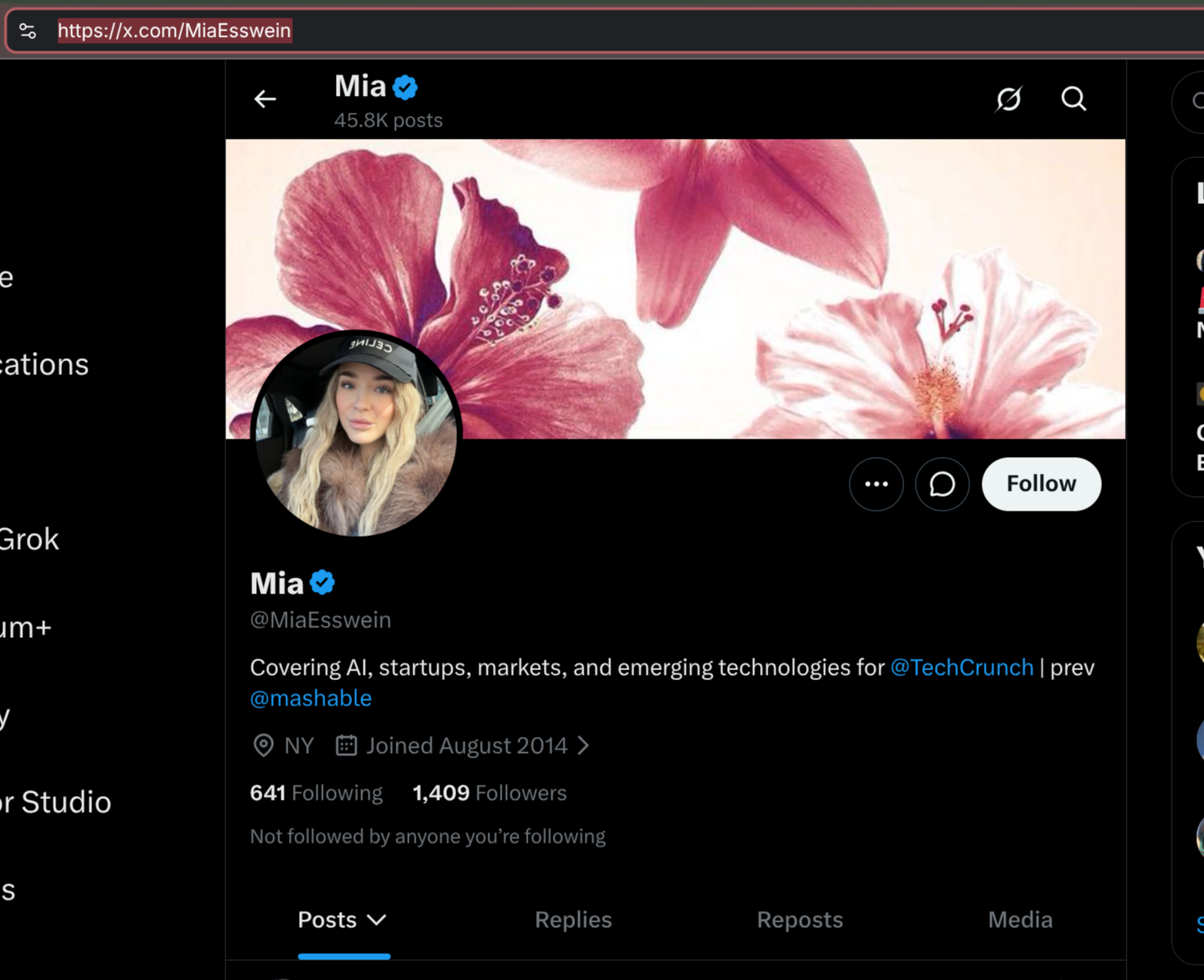
The bio reads: “Covering AI, startups, markets, and emerging technologies for @TechCrunch | prev @mashable”. Verified badge, account since August 2014, more than 45,000 posts, 1,409 followers. By the numbers, it looks like an old, active account, not a profile created yesterday.
The Conversation
Here’s the full exchange, nothing cut:
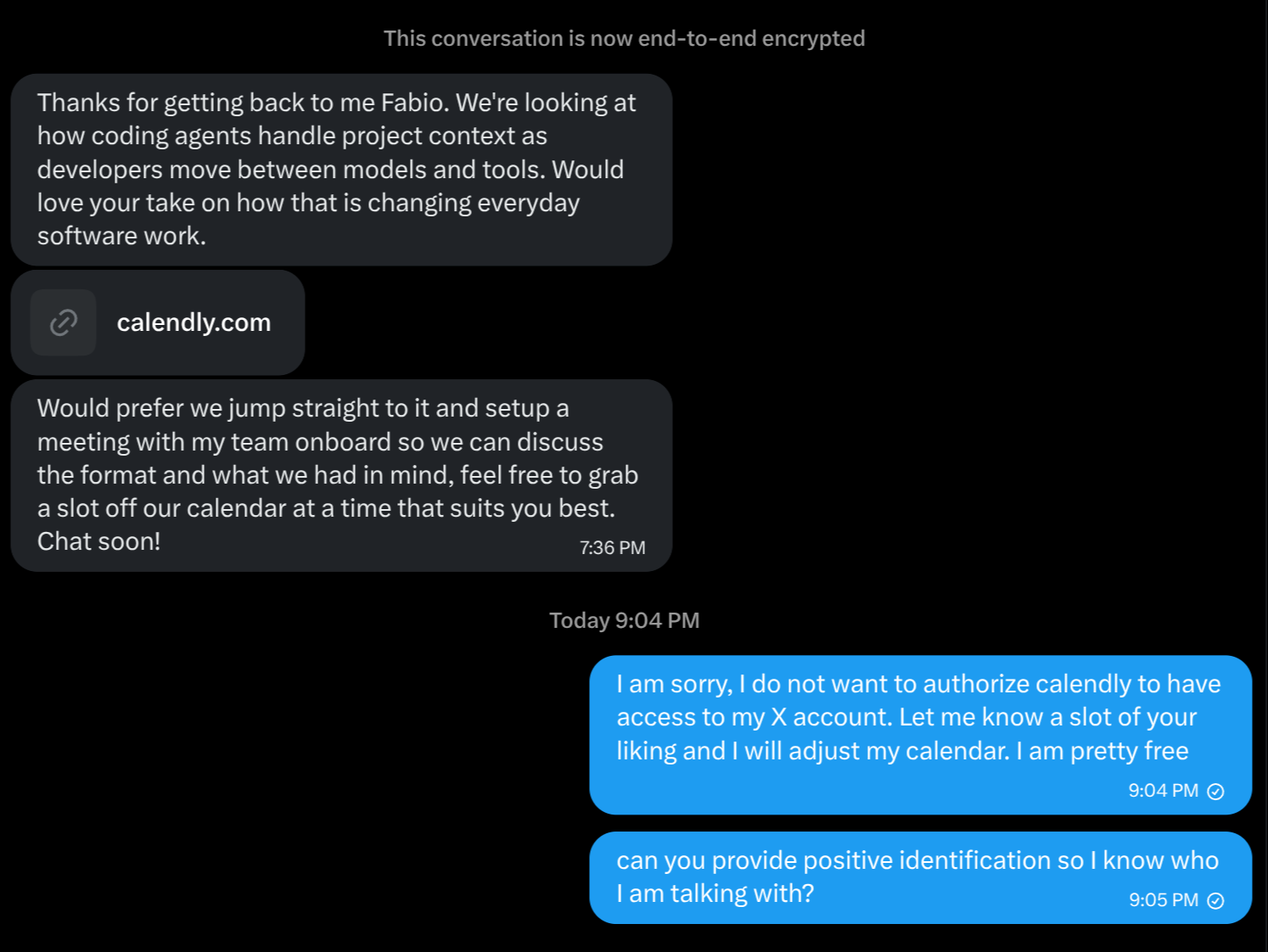
And here’s the link, exactly as it came, for anyone who wants to recognize it if they got the same one:
Confirmed phishing link. Don’t click it. If you already did, don’t authorize anything.
https://calendly.com/d/d336-3mq-q2z
I Already Knew It Was a Scam
I recognized the pattern instantly because José Valim, Elixir’s creator, fell for this exact lure in March this year and documented the whole thing publicly.
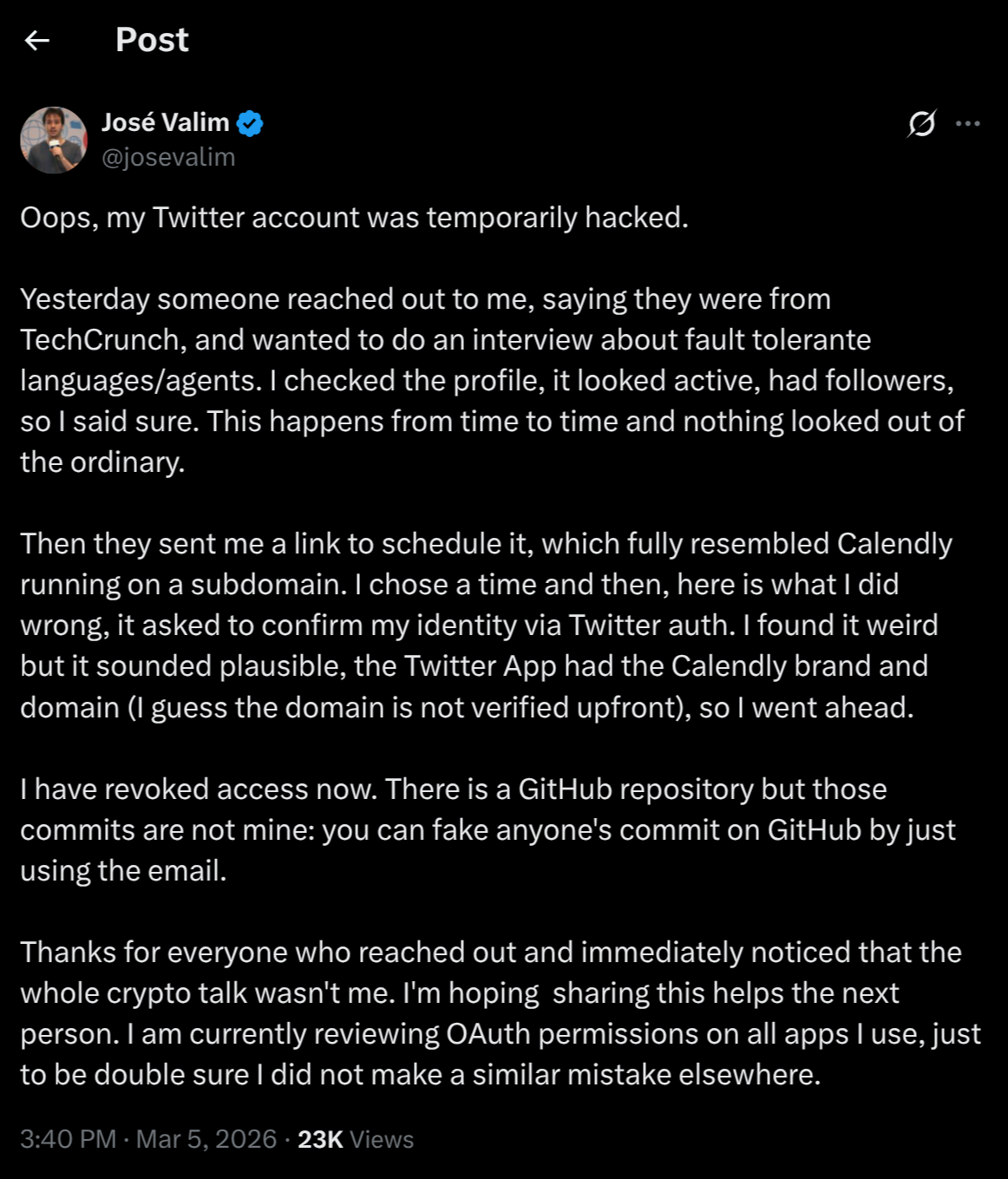
Same pretext, TechCrunch asking for an interview on a technical topic the victim knows well. Same mechanism, a Calendly link that ends in an X authorization. His account ended up being used to spread crypto spam before he revoked access.
When the message landed for me today, I almost cheered. I knew right away it would make good blog material. So I kept the conversation going politely, just enough to screenshot everything, and now I’m exposing the account publicly. Always expose whoever tries to scam you. This isn’t about humiliating anyone, it’s about leaving a public trail for the next person who gets the same message and goes looking for it on Google.
Even Without Knowing About Valim’s Case, I Could Tell
A cold contact asking for a meeting out of nowhere, with no prior introduction, is a scam 99% of the time. No real professional operates that way, and even less so over a social media DM. Doing that makes you a door-to-door salesman with Wi-Fi.
A big-name outlet in the pretext changes nothing for me. I consider myself better than TechCrunch or washed-up Mashable, and not even someone claiming to speak for the White House would impress me. Sorry, not sorry about that.
And even if there were a normal person behind it: my time isn’t free. Want real consulting? Talk to my company, set up a commercial meeting on the company’s Calendly, sign a contract, pay the fee, and only then do I talk to you. There’s no “let’s just hop on a quick call” shortcut with a stranger.
The moment I clicked the link, it redirected straight to the X authorization screen, obviously I refused. I clicked on purpose just to grab the screenshot.
The Technical Mechanism
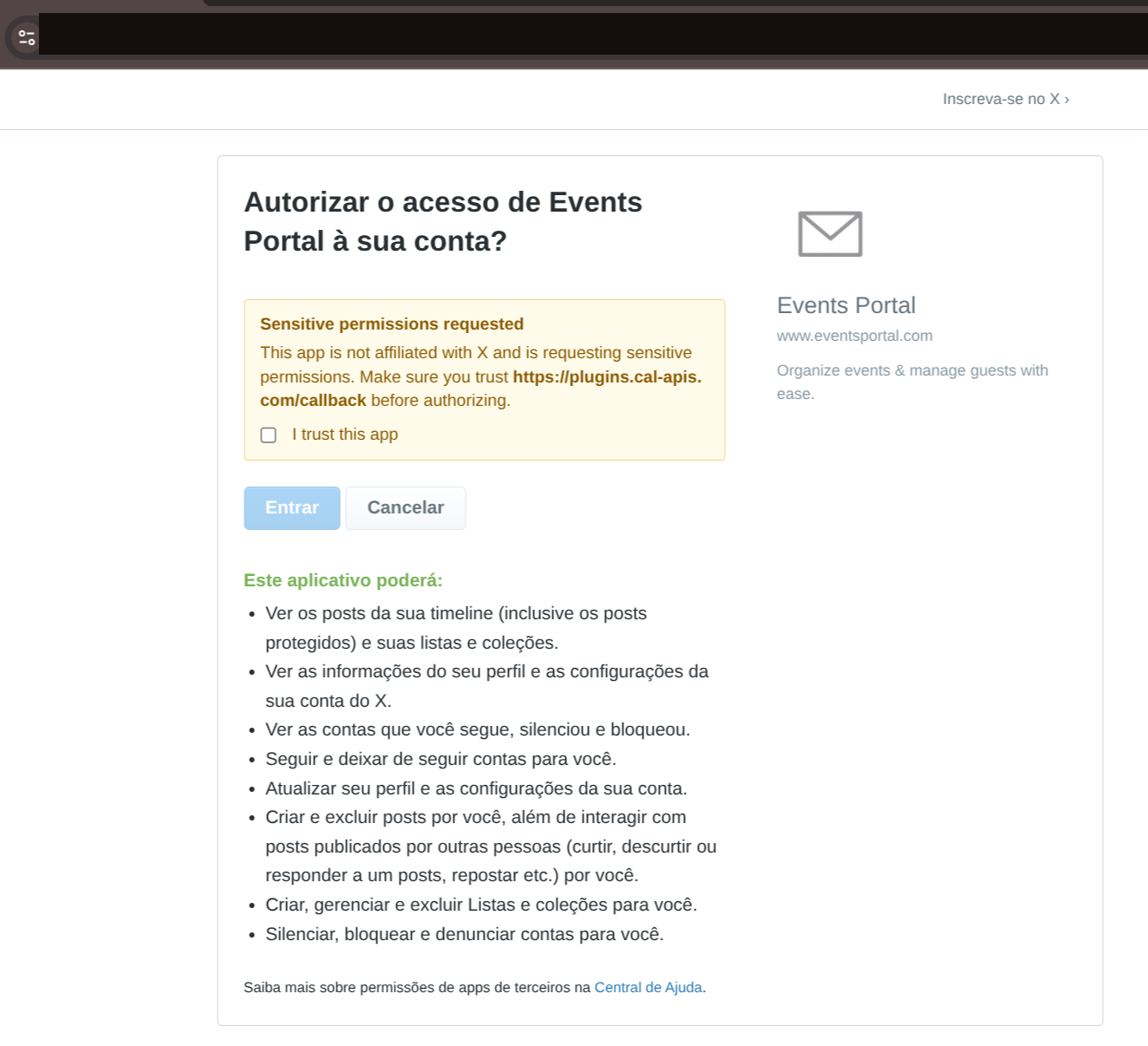
A reader pointed out that the address bar in the original screenshot showed an oauth_token in the URL, and asked whether that was unsafe to publish. Fair question, and I edited the screenshot to remove that part anyway. But the actual risk there was zero: that’s an OAuth 1.0a request token, not an access token. It only turns into a real credential after authorization is approved and the app exchanges that token for a verifier alongside its own secret key, neither of which happened, since I clicked cancel. An unused request token also expires on its own within minutes, by X’s own design. Even with zero risk, it costs nothing to crop it out, and it’s a good general rule: never publish anything that looks like a token, even one you’re sure is already dead.
The first step is real: calendly.com/d/d336-3mq-q2z runs on genuine Calendly infrastructure, I confirmed that by hitting the link directly and checking the cookies and response headers, all authentic. It’s a standard routing form for the product, name and meeting type.
The scam lives in what happens after you submit the form. Calendly has a legitimate feature to “redirect after booking,” and that’s exactly the feature that got configured to send the victim to an X OAuth authorization screen. That screen is real too, it runs on api.x.com, X’s genuine domain. The scam doesn’t fake the login screen. It abuses a genuine Calendly feature to chain into a genuine X screen, authorizing a malicious third-party app.
And here’s the part I want to underline: this isn’t some exotic bug hidden in an obscure corner. It’s a pseudo-feature turned on by default, a free redirect to any URL after booking, with zero destination checking. Until Calendly disables or at least restricts that redirect, it stays a ready-to-use phishing vector, and closing that door is Calendly’s job, not the job of the user who just wanted to book a meeting.
That app is called “Events Portal,” claims to be www.eventsportal.com, and X itself shows a warning: “This app isn’t affiliated with X and is requesting sensitive permissions,” with the callback pointing to plugins.cal-apis.com, not to any real Calendly domain. The permissions requested amount to a full account takeover:
- see protected posts, lists, and collections;
- see account and profile settings;
- see who you follow, mute, and block;
- follow and unfollow on your behalf;
- update your profile and settings;
- create and delete posts, like, repost, and reply on your behalf;
- create, manage, and delete lists;
- mute, block, and report accounts on your behalf.
With that authorized, the account becomes a weapon to attack the next person, exactly what happened to José Valim.
What I Confirmed Myself
A real Calendly doesn’t ask for a social media login to schedule a meeting, full stop. What the screen showed is the legitimate “redirect after booking” feature hijacked to become a phishing vector against an X account. I didn’t stop at the first impression, I went and confirmed every piece myself:
- the domain
cal-apis.comwas registered only six days earlier, on September 16, 2026, through a Chinese reseller tied to Alibaba Cloud, hidden behind Cloudflare nameservers. A disposable domain, built specifically for this, not real infrastructure from any actual company; - security researchers (Push Security and Validin) have documented Calendly-themed phishing campaigns used to steal Google Workspace and Facebook Business accounts, same family of scam, different target than mine;
- specifically against X accounts, what’s documented is firsthand reporting: José Valim himself, and a public report from February 2025 describing an almost identical scam, a fake Calendly link leading to an X login, that nearly caught two other well-known people in the tech community;
- I found no record of “Mia Esswein” as an actual TechCrunch or Mashable journalist in any search. That’s not definitive proof of anything on its own, but it adds to the rest of the pile of evidence.
The Checklist I Use
- a cold contact asking for a meeting, with no introduction, is a scam until proven otherwise;
- a real scheduling tool never asks for a social media login to book a slot;
- a third-party app requesting “sensitive permissions” and warning that it’s “not affiliated” with the platform is a red flag, not an ignorable technical detail;
- if you already authorized something like this, revoke it now: on X, Settings → Security and account access → Apps and sessions;
- report the account that sent the link, and report the Calendly event if you still have the conversation.
To Whoever Tried
You picked the wrong person to try this on. I don’t talk to strangers for free, on principle, and I definitely don’t authorize unknown apps on an account I use for work. I recognize the pattern from a mile away because I read about this stuff, and on top of that I got a free article out of it for the blog. Next time, invest less in a domain registered in a rush and more in a disguise that survives someone actually paying attention.