
It’s past two in the morning and I’m still awake because I just watched the new Tesla Roadster climb a vertical ramp live, stop upside down, then spin in midair and land in one piece on another run.
I expected a fast car. I didn’t expect one with ten compressed-air propulsion nozzles using SpaceX-derived technology, plus an underbody suction system capable, according to Elon Musk, of pulling up to 2 G. During the demo, Tesla announced zero to 60 miles per hour, nearly 97 km/h, in 0.81 seconds. It did not disclose the measurement protocol.
This is the future I wanted to see.
The entire demonstration is in Tesla’s official livestream. Road & Track measured and described the maneuvers, while TechCrunch detailed the three versions: Performance with active aerodynamics and suction, Thrust with rear thrusters, and Rocket with a ten-nozzle propulsion system and a single seat.
Of course, we watched a prototype in a controlled demonstration. Tesla expects production to begin in 2028, and the Rocket version is not approved for public-road use. Still, an actual car left the ground, rotated, and landed. I watched it live from my office. It was spectacular.
While Musk was landing rockets and making cars fly, I was doing something far smaller and more mundane: fiddling with my websites.
Six sites in about a day
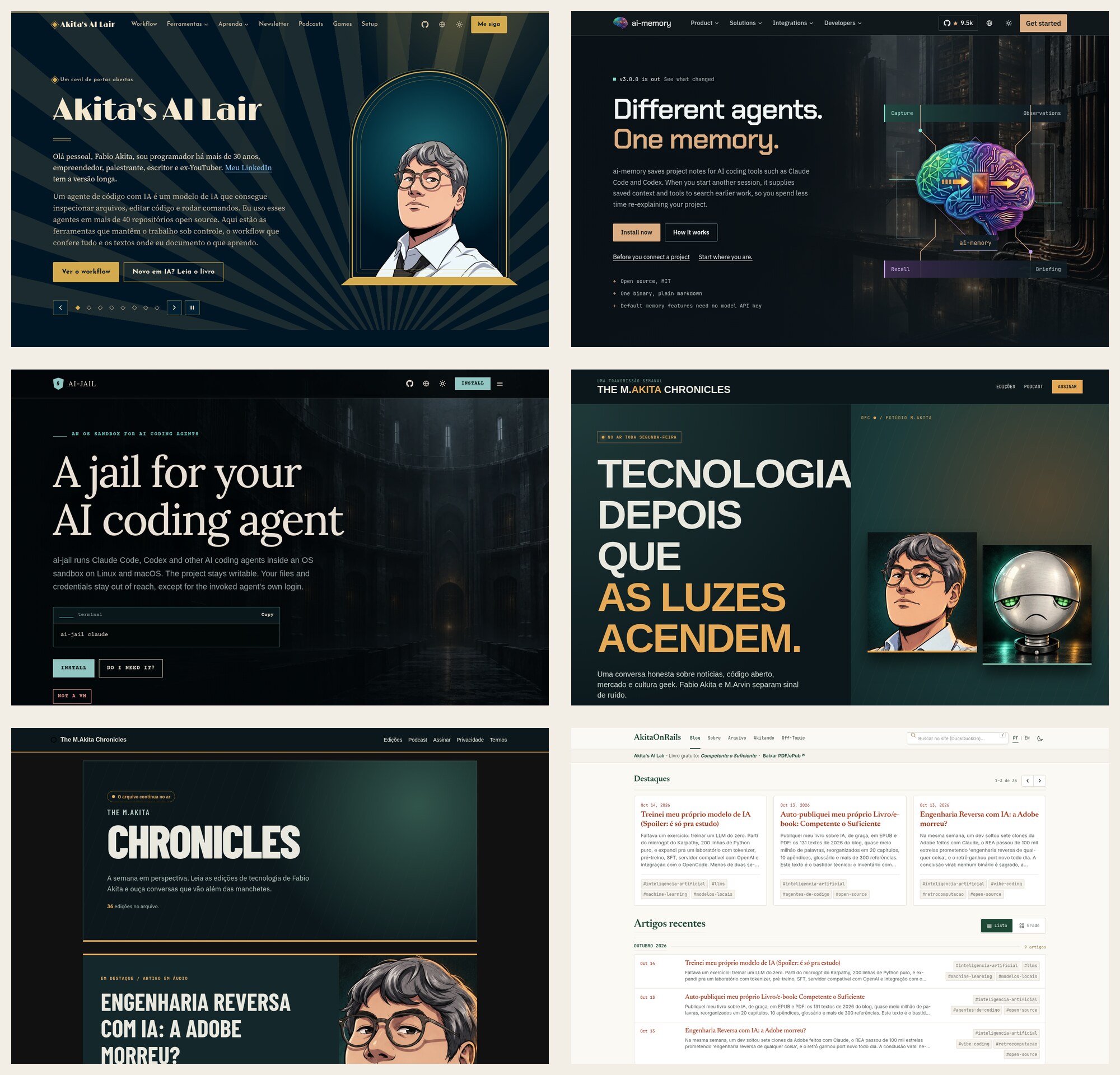
Before the Tesla event, I spent the entire day redesigning six sites:
- Akita’s AI Lair, now matching the look of my new book, Competent Enough;
- ai-memory;
- ai-jail;
- The M.Akita Chronicles newsletter;
- the newsletter archive;
- and this blog, AkitaOnRails.com.
They all started with variations of that default theme Claude makes. Dark background, purple or blue gradient, huge sans-serif type, rounded cards, a glow behind something. It works. It has also become so common that you can spot a “site made by Claude” before reading the title.
I had already tried asking Claude for different designs. It changed the color, moved the cards around, and delivered the same visual grammar. I posted some screens and the result of the change on Twitter. I’m no web designer, and for a while I accepted “it works.” Yesterday I got tired of it.
Someone suggested Stitch by Google. It’s an experimental Google Labs tool that turns instructions and images into editable interfaces and front-end code. The first version launched in 2025 on top of Gemini; the current version has become a design canvas with an agent, prototypes, and export to a DESIGN.md that other agents can follow.

I signed up, got the API token, and went to work. Stitch generated visual directions. Claude Code and Codex brought those directions into the real repositories, adapted the components, fixed responsiveness, replaced images, adjusted SEO, tested, and deployed. When one quota ran out, I continued with the other.
The six sites come from five repositories. Looking at them side by side made one thing clear: Stitch responds much better when it receives a concrete metaphor, the audience, and what the product needs to communicate. ai-memory became a memory archive. ai-jail became a cinematic prison. AI Lair adopted a 1950s and 1960s world’s fair, drawn from my book cover. The newsletter became a late-night broadcast, and this blog became an editorial archive. Five different identities instead of five variations of Claude’s same gradient.
The pretty prototype is the easy part. The job only ends when the visual language reaches internal pages, the article, the book reader, email, legal pages, error states, and mobile. That’s what the agents did inside the repositories. On ai-memory, for example, verification covered 102 pages in six languages, light and dark themes, desktop and mobile. On The M.Akita Chronicles, the same design had to work across signup, archive, newsletter detail, podcast, and the email template. A Stitch mockup solves none of that by itself.
Each site went through several rounds of prototypes. Some looked awful. Others had one good idea surrounded by bad decisions. I told the agents to throw them away, preserve one part, mix it with another attempt, and start over. Code is cheap now, so there is no reason to fall in love with the first version.
The result won’t win a design award. A professional designer would still find hundreds of things to improve. I know I could take it further by spending a few more days. It looks much better than it did, though, and for now it is competent enough.
Six existing sites redesigned, responsive, with SEO, image generation and replacement, HTML, CSS, and JavaScript adjustments, testing, and production deployment. One person. About a day. A year ago, that package would have taken weeks or months.
Keep the scale in perspective: these are small sites, mostly landing pages and content pages. Nobody is rebuilding Amazon.com’s entire collection of pages and systems in a day. The experiment shows how much repetitive work has already moved out of the way within a scope that one experienced person can understand and review. Large projects remain large, full of private rules, old integrations, strange states, and decisions that do not fit in a prompt.
Even the first proofreading pass can be automated
As part of the same process, I had agents review the sites as different readers. This wasn’t grammar correction. I wanted to know what someone would understand in the first few seconds, where they would get lost, which promise would sound suspicious, and whether they could complete a task without already knowing the product.
On ai-jail, I used two isolated sessions. One played a skeptical engineer who approves every prompt and had never heard of the project. The other was a non-engineer managing eight developers, trying to decide whether to approve the tool for the company. On ai-memory, I used three: an engineer learning AI tools, a manager evaluating a pilot, and a parent with no agent experience who worried about AGI and jobs. Each one read the site without seeing the others’ reports.
Anyone can do the same thing. Run the application locally or open a preview deployment, start fresh sessions, and give each agent a concrete task. A basic prompt can look like this:
Open this site on desktop and mobile: [URL].

You are [persona], know [context], and have never seen this product.
Your goal is [specific decision or task].

Navigate as this person. Do not read code or internal documentation first.
Record:
- what you understood in the first ten seconds;
- what you think the product does and who it is for;
- where you did not know the next step;
- contradictory, absolute, or hard-to-believe promises;
- terms the site uses before explaining them;
- reading, keyboard, contrast, touch, and responsiveness problems;
- what would stop you from trying, buying, or approving it.

For every finding, show the page and visible evidence.
Separate factual bugs, usability problems, and subjective preferences.
Do not propose a broad redesign. Suggest the smallest change that solves the problem.
I prefer three independent sessions over an agent roundtable. Once one reads another’s report, it starts agreeing by inertia. A separate session can then consolidate repeated points, discard matters of taste, and check every claim against the code and product documentation. A review can flag a sentence as wrong; it has no authority to invent the right one.
The most useful results tend to fall into four groups: positioning, information order, path to the first action, and trust. Traditional automated tests still handle broken links, contrast, accessibility, overflow, and error states. The persona tells you that a technically accessible button appeared five screens below where the person needed it.
During the ai-jail proofreading, both profiles agreed that the site took too long to show a concrete risk and started speaking like engineering documentation too early. The threat of a poisoned page moved directly below the hero. New sections explained “What changes on day one” and “For the person who must approve this,” including operating cost, limitations, and the keys a company actually exposes. The review also caught a technically incorrect claim repeated across several pages: the network does not stay entirely off by default. The agent’s own API host and, on Linux, registries remain accessible. This kind of reading catches documentation bugs too.
The ai-memory report found permissions described in contradictory ways, privacy promises that were too absolute, and the basic explanation buried under advanced features. During the second round, the profiles noticed that remote-access instructions told users to use HTTP before requiring TLS, that an unauthenticated curl promised the wrong response, and that important choices appeared far too late on mobile. The collection guide moved from about 4,364 pixels from the top to 1,617; the individual and team paths moved from 5,300 to 2,489. That’s an objective improvement born from simulated reading.
In the AI Lair redesign, the new-reader review reorganized the entry path. A later revision made it explicit that my setup with multiple agents and two monitors is a mature configuration, not a requirement for starting. One person, one project, and one agent are enough. It also produced a pilot plan for managers: a reversible task, non-sensitive data, an acceptance criterion, deadline, budget, and measurement. The next audit found invalid ARIA and an animation that hid the opening copy from assistive technologies; the fix took axe-core from four serious violations to zero.
Simulated personas still fall far short of human feedback. They carry the models’ same biases, may agree with the prompt, never feel the irritation of someone who lost twenty minutes, and never take the risk of entering their own credit card. The reports serve as hypotheses. A real user will always find the case that I, the agent, and the test suite failed to imagine.
Before the first user exists, however, the alternative is usually no review at all. Two or three independent readings already catch contradictory promises, unexplained jargon, buried information, and a flow that only makes sense to its author. These readings cost little and make the product less stupid before it reaches actual people.
HTML was never programming
For years, I watched people perform some remarkable mental gymnastics to argue that “HTML is a programming language” and therefore anyone who writes HTML is a programmer.
HTML is markup: it describes a document’s structure. CSS describes presentation. That has value, requires knowledge, and can become terribly complex. Accidental complexity does not turn markup into programming.
There is no shame in that. I started building sites in the 1990s. I received a Photoshop layout and turned it into HTML. I sliced images, built tables, adjusted pixels, opened the result in multiple browsers, went back, and tried again. It was honest work and paid my bills.
It was also basically mechanical work: copy, paste, adjust, look, repeat. Exactly the category computers should automate.
Today I still chose the visual direction, rejected bad proposals, decided what each site needed to communicate, and recognized when the result was good enough. The agents handled the grunt work. This should have happened years ago.
The bubble delayed automation
For much of the 2010s, US interest rates stayed near zero. Cheap money flooded funds, startups, and large companies. Hiring more people was easy, and the market absorbed any amount of manual labor disguised as engineering.
Low rates explain only part of tech’s expansion. A field breaking hiring records has little incentive to eliminate its own repetitive work. If you can put fifty more people to work assembling screens, you put fifty more people to work assembling screens.
Anyone who attended my talks at tech events in the 2010s may remember Constraint == Innovation. Yes, the original title used two equal signs. I gave that talk at DevConf 2019, the 83 slides are on my SlideShare, and I had already written the same argument in 2013 in “Constraints are liberating: less is more”.
It’s the old maxim: necessity is the mother of invention. Constraints force choices. Choices force priorities. When the conventional path cannot fit the money, deadline, or available capacity, someone has to find another path. That’s where real innovation often comes from.
Money funds expensive research, buys equipment, and gives people time to experiment. Excess money without pressure for results does something else: it hides inefficiency with brute force. There is no need to automate, simplify, or discover a better solution while you can keep hiring and growing the spreadsheet. Too much abundance turns a technical problem into an operating expense and postpones the difficult decision.
I repeated this warning at the beginning of 2026: the programming bubble managed to replace efficiency with volume. Constraints returned when cheap money ended. Coincidentally, agents arrived at the same time and gave companies a practical way to automate the mechanical work they had spent a decade scaling through hiring.
That’s how we spent a decade recreating the same admin dashboard and calling it innovation. Every week brought the next front-end savior: React, Angular, Vue, Svelte, another bundler, another framework on top of the framework. They are useful tools in the right context, but none addressed the obvious question: why is a human still hand-writing the thousandth variation of the same form?
The hiring bubble burst in 2022 and ended the party. At the end of that year, ChatGPT brought language models to the public. GPT-2, just to keep the chronology straight, had come out in 2019. Four years after ChatGPT, agentic programming became a normal work tool.
Any task that consists of copying a pattern, adapting an example, running it, looking at the error, and trying again is already within these agents’ reach. Front-end is the most visible target because it accumulated an absurd amount of this work. The rest of programming has no mystical shield. Plenty of back-end work is CRUD, glue between APIs, and repetitive configuration. That will be automated too.
Fine by me. Programming was never about typing code. Programming is making a computer do something useful.
VS Code is the new punch card
I wrote about exactly this in April in “VS Code Is the New Punch Card”.
For decades, the interface between intention and computer kept changing. First you connected wires and switches. Then you punched cards. Then you wrote Assembly, C, high-level languages, frameworks, and configuration. Each generation looked at the previous one and automated another layer of manual work.
No sane person would argue today that operating a card punch was the essence of computer science. It was the available interface. Typing every tag and CSS rule into VS Code was also the available interface.
Now I describe the intention, show references, evaluate the result, and tell the agent to fix it. I still need to understand browsers, networks, caching, accessibility, semantics, responsiveness, and SEO. Without the fundamentals, I couldn’t tell whether the agent delivered a solution or a pretty time bomb. The keyboard lost importance; judgment gained it.
Today, every Tier A model I test, from Claude to Kimi, can reliably execute the mechanical front-end work that appeared in these six projects. I can say without hesitation that any front-end task that merely turns an already-made decision into code is automatable. They needed direction to create the six designs. None required me to hand-write the flexbox, breakpoint, or component I had already explained.
That covers an enormous share of the work while leaving the most valuable part. Someone still has to know the framework’s tradeoffs, understand the browser, choose the architecture, notice when a library is being forced against its design, and find out why an apparently correct solution breaks under a particular combination of device, language, state, and real data. The agent writes the code; an experienced professional provides direction, limits the damage, and owns the result.
Front-end still exists. The excess mechanical work and the people hired only to follow a finished recipe lose value. A great front-end professional can direct agents and deliver far more than they could alone. A mediocre professional who spent years mistaking component typing for engineering will compete for fewer openings. The market gets smaller and more selective, with its best professionals producing more. The goal remains what it always was: get close to the top, where judgment and experience still make a difference.
And it doesn’t stop at the browser. Pick the framework: Android with Flutter or Kotlin, iOS with Swift and SwiftUI, desktop with Rust/Tauri, Flutter, C#, or Electron. Modern agents generally know the components, build tools, tests, and peculiarities of these platforms. They still need direction, feedback, and verification, just as they do on the web front-end. The mechanical part is already automatable.
I tested this in my own small open-source projects. FrankYomik has a Flutter client for Android and Linux, plus the server and extension. Frank Sherlock is a Rust/Tauri desktop app that produces an AppImage for Linux, a DMG for macOS, and a .exe installer for Windows. I also built Frank Karaoke in Flutter for Android and FRANK MANGA+ in Rust/Tauri for desktop. There are several others on my GitHub.
None came out perfect from the first prompt. Flutter and Tauri gave me trouble, especially on the early projects. Reliable means the agent can move forward, receive a correction, create tests, fix what broke, and reach a working application without making me take over the manual typing. After testing web, Android, and desktop across different stacks, I’m very satisfied with the result. The pattern repeats: mechanical work became agent work.
At two in the morning, I had agents making the final adjustments to this blog without losing pace. That’s what I need.
When the web still didn’t know what it was
At the peak of the dot-com bubble, career designers were creating websites. The web had not yet decided how a page should work, so there was real room to experiment. It was often ugly and almost always heavy, but actual creation was happening.
The iPhone opened another window in 2007. Suddenly everything had to fit on a small screen, respond to touch, and work without a mouse. Years of experimentation followed before the market settled on a reasonably stable grammar for navigation, gestures, forms, and content.
Today nobody needs to rediscover a menu, a list, a checkout, or an article page. The patterns are documented, millions of examples are public, and models have seen more interfaces than any person could study in a lifetime.
The most valuable work remains: understanding the product, the person who will use it, the constraints, and what deserves to appear first. Converting a finished decision into hundreds of predictable lines has become a perfect candidate for automation.
Jobs disappear. Others appear
The world has never stopped to preserve a job function.
Punch-card operators entered data and programs on paper cards. Telephone operators physically connected calls. Typists kept offices running. Linotype operators cast lines of hot metal to print newspapers. Technology reduced or eliminated these occupations at scale. The Bureau of Labor Statistics’ current list of fastest-declining occupations still includes data entry keyers, typists, and telephone operators. Nobody proposes bringing them back to protect jobs.
At the same time, jobs appeared that a person in 1926 could not even name: mobile developer, SRE, experience designer, Internet video creator, cloud specialist, machine learning engineer. The web itself killed old work and opened an entire industry.
The real story is messier than the caricature. The ILO shows that technology tends to automate tasks without necessarily eliminating entire occupations. Some functions shrink, others change, and new jobs appear. That statistical consolation does nothing for the person who became obsolete today. The individual has to react before the economic average reacts for them.
Compare 2026 with 1926, three years before the crash of 1929. It looks like another planet, even though a century is very little on history’s scale. No contract guarantees that your current function will survive the next ten years, much less the next forty.
How does a junior gain experience now?
It will get harder. The old ladder began with someone paying a beginner to assemble simple screens, fix CSS, and copy components. An agent does much of that faster and cheaper. No company has an obligation to preserve inefficient work as a training program.
Beginners will have to build their own ladder with real projects and problems they are responsible for. That includes reading the code the agent generated, breaking and repairing it, studying documentation and source code, writing tests, and contributing to open projects. An agent gives any student access to an amount of practice that once required a team. Anyone who uses that access only to generate code they do not understand will remain a junior for a long time.
The market will reward people who make that extra effort. It always has. When someone asks how a junior can gain experience without the easy tasks, the hidden question is often different: “how do I get a better salary without doing the hard work of getting good?” The easy position, with rising pay and little pressure, was a distortion of the bubble. Adapting includes accepting that entry has become more competitive.
My career never stayed in one place
I started with multimedia and static websites. Then I worked in a digital agency, enterprise consulting, SAP integration, startups, video, education, and now AI. In my Akitando episode about SAP, I tell part of that phase when I had to learn a world completely different from what I had done before.
I lived through the dot-com crash, the 2008 crisis, and the end of the zero-rate bubble. I survived because I never treated my current function as a permanent identity. I kept studying, gaining experience, and changing direction.
A productive career should not consist of repeating the same mechanical task for decades. If your value depends on the market continuing to pay someone to push tags and pixels by hand, the problem did not begin with AI. The problem was betting that the present would last forever.
Many people understand “being prepared” as studying the bare minimum required for today’s open position. That’s the fastest recipe for becoming obsolete. Do the short-term work, but study beyond it. Learn the things that seem useless today. Fundamentals, operating systems, networks, databases, business, economics, history. You don’t know which combination will save your career five years from now.
I spent years talking about this on Akitando. Revisit the I Warned You and Which course should I take? playlists. If you have to start with one video, start with the Definitive Guide to Learning How to Learn. No course can save someone who still outsources their own learning.
The world has no shortage of opportunity. Most people feel they never get one because they are always unprepared when it appears. Once the opportunity lands in front of you, it is too late to start preparing.
So I won’t mourn the fact that this package of six small sites, which used to take weeks or months, fit into about a day. I’m happy as hell. I gained time to think about what to build, experiment more, and throw away bad versions without wasting weeks of my life.
Today I watched a car spin in midair and land. In about a day, I put six sites with new designs into production without writing most of the HTML and CSS. The future I wanted did not arrive perfect, cheap, or evenly distributed. It arrived far enough for me to work with it.
Accept what ended. Study what comes next. Be ready before the next opportunity appears.